
Most HubSpot lead scoring models treat every tracked action the same way: someone did the thing, add points, move on. A five-second page view and a webinar someone stayed on for 45 minutes can end up worth the same number of points, because the model was built around a flat list of actions instead of what each one actually reveals.
That's backwards, and it shows up worst wherever HubSpot already has the most detailed data sitting untouched. Webinars are the clearest case: a registrant who watches eight minutes and drops off gets the same "attended" point as someone who stays for the full session, answers a poll that reveals their tool stack, and asks a pricing question in Q&A.
On a contact record scored this way, both look identical. They are not the same lead, and treating registrants and leads as interchangeable is exactly where most scoring models start going wrong.
Most HubSpot lead scoring models flatten your best signal into a single point value
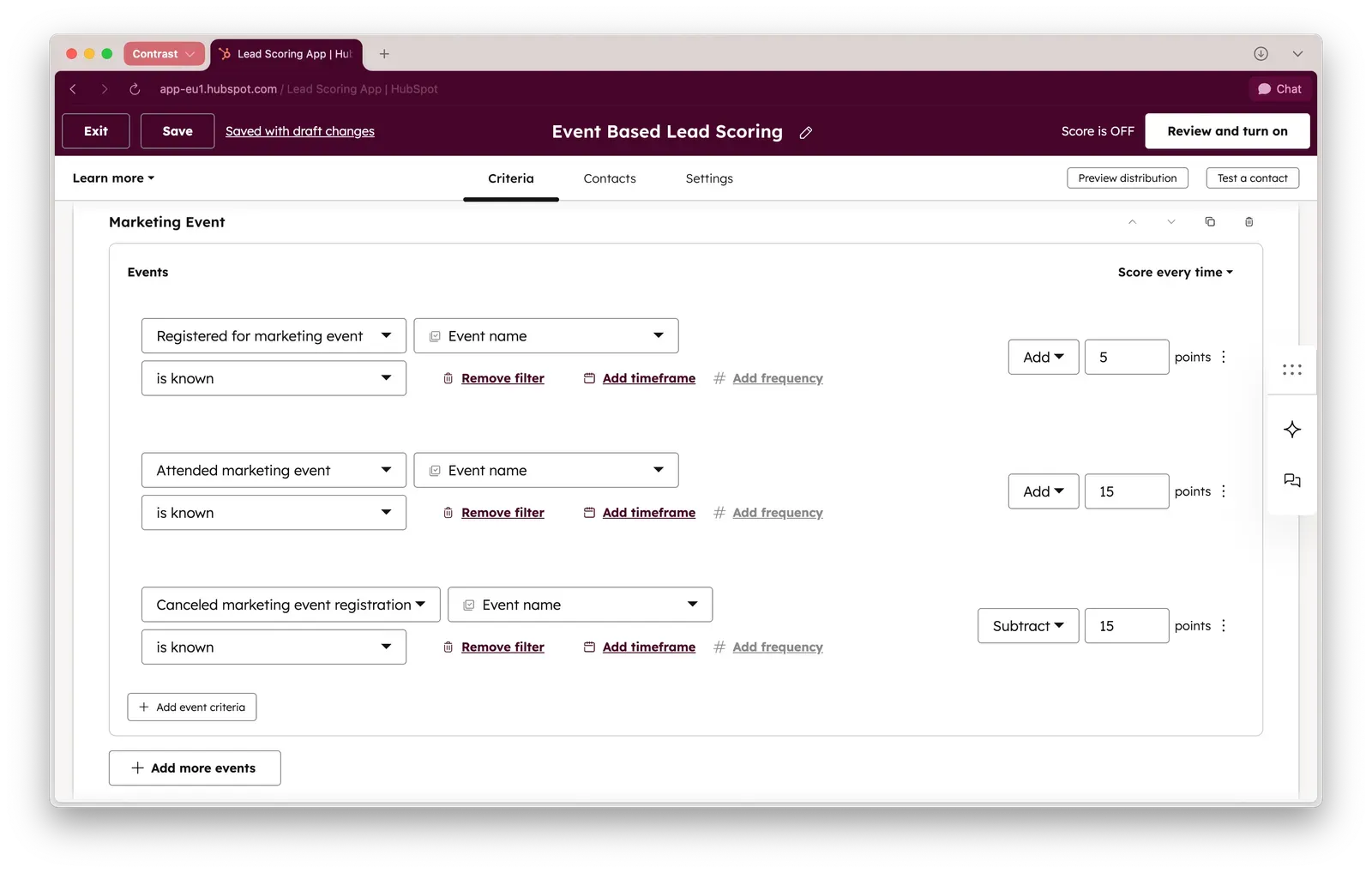
What most people built in HubSpot's lead scoring tool looks something like this: 5 points for registering, 15 for attending, minus 15 if someone cancels. That's a reasonable baseline. The problem is how often it's also the finished model. Attendance becomes the ceiling of what webinar data contributes to the score, when it should be the floor.
Sales feels the gap immediately. A lead is a name that showed up somewhere once. A prospect has moved through content toward an actual decision. A scoring model that stops at "attended" hands sales a list of leads and calls it pipeline, and reps can tell the difference within one call. Getting the basic sync running is a five-minute task; getting the model right is the harder, more valuable part.
The fix is scoring what happened inside the session, not just whether someone was in the room.
Score engagement and fit as two separate axes, then combine them
Attendance gets treated as a stand-in for fit, and that's the wrong axis to load it onto. Liana Hakobyan of Iris AI put it plainly on a Contrast webinar about AI-assisted lead qualification:
"Someone can have the perfect job title and still have zero interest. On the other hand, someone with a slightly less perfect title, who stayed the entire webinar, asked a question, and clicked on resources you shared, that person is hot."
The model that holds up is two separate scores, combined. An engagement score answers what someone did: attended live, watched most of the replay, answered a poll, asked a question, clicked a link. A fit score answers who they are: job title, company size, industry. Neither one alone tells you whether to call someone this week.
In practice, that means sorting every registrant list into three buckets instead of a binary attended/didn't-attend split. Passive observers registered and never showed, live or on replay, so they get a soft nurture. Mildly engaged attendees showed up but watched less than half the session and asked nothing, so they get a longer nurture track, not a sales call. Highly engaged attendees stayed for most of the session, answered a poll, asked a question, or clicked a CTA, and that combination is what earns fast, specific outreach.
Build the HubSpot lead scoring model from event data, not contact properties
HubSpot contact properties overwrite, no matter what generates them. If a property tracks "last poll answered," a new answer replaces the old one and you lose the history.
App Events, sometimes still called Integration Events in the scoring UI, do the opposite: every poll answer, every CTA click, every Q&A question stays logged as its own event, permanently. For a score meant to reflect accumulated behavior across several sessions, events are the only version that doesn't quietly lose data every time a contact shows up to another webinar.
However, most webinar platforms do not sync this data to HubSpot. That means you're effectively limited to set up lead scoring in a suboptimal way . You're putting people in buckets based on their attendance – while all the detail is lost or still stuck in your webinar platform.
Nearly 500 apps in the HubSpot marketplace fire events this way. What varies enormously between webinar platforms is how much of a session becomes usable event data versus a single "attended: yes/no" checkbox. HubSpot's own Marketing Events sync is the layer that determines which one you get.
Contrast webinars is the platform that surfaces the most data points for you to use in HubSpot. It's consistently rated as the best webinar platform for HubSpot with a 4.9 Rating on the HubSpot Marketplace.


Turn webinars into measurable revenue
Connect HubSpot to Contrast and finally see what’s driving ROI
Book a demoWeight signals by what they reveal, not by how easy they are to track
Not every action deserves the same points, and the temptation to give every tracked event a flat 10 points misses what makes any single engagement signal valuable in the first place: some reveal far more than others. Webinars make the gap easiest to see, because a single session throws off several signals of very different quality at once.
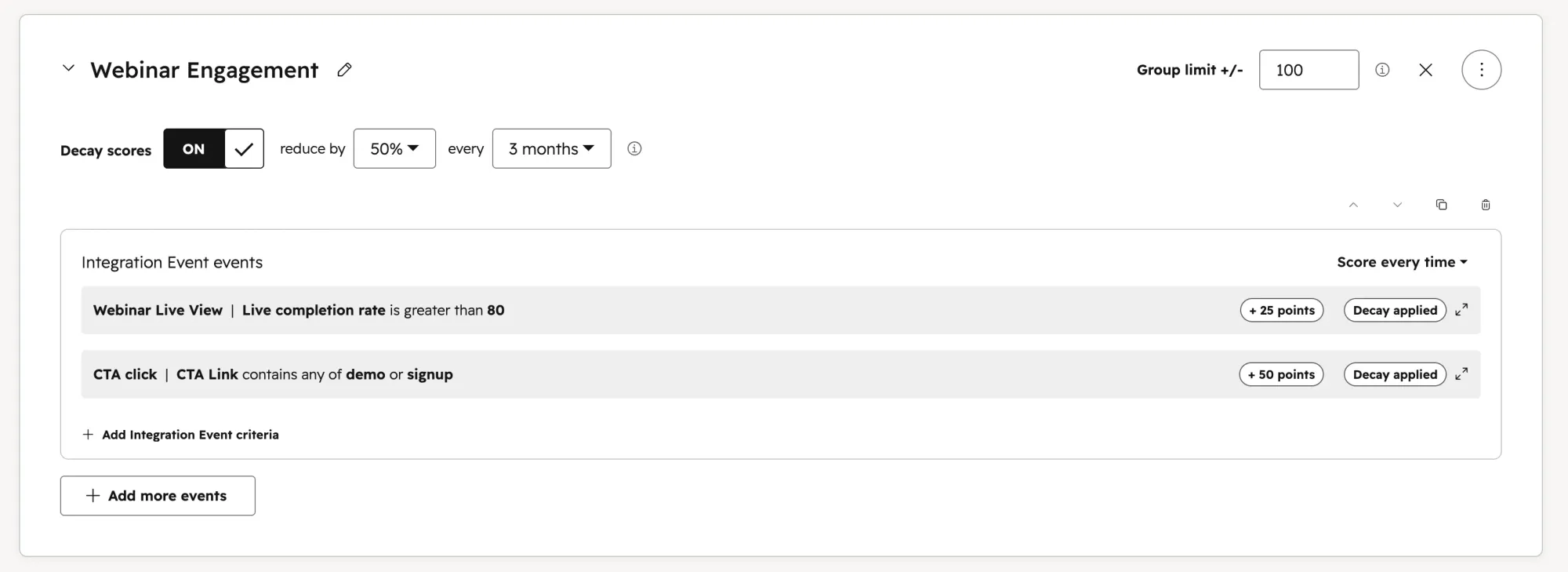
Watch time is the floor. A live completion rate over 70% is a workable cutoff for real attention, rather than counting anyone who joined for two minutes.
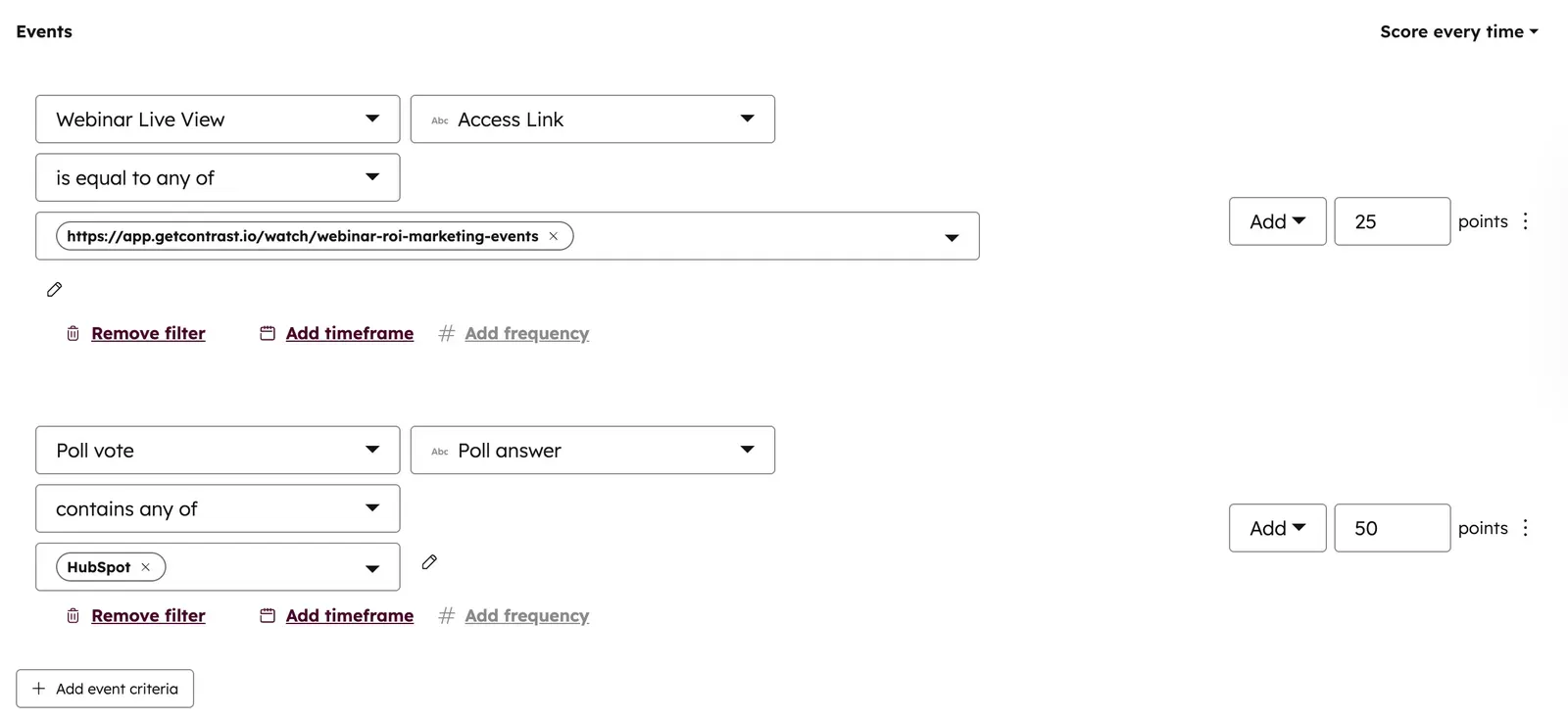
Poll answers sit well above attendance on their own, worth 35 points or more in a well-built model, because a poll answer is self-reported, not inferred. When a poll answer also reveals fit directly, someone naming the exact tool in their stack that matches your ICP, that single answer can outweigh almost everything else. Worth 50 points on its own.
Q&A questions carry similar weight, especially when filtered by keyword: a question containing "pricing" or "demo" signals something a generic "asked a question" point never captures.
CTA clicks close out the list. Useful, but the easiest signal to fake by accident, since a curious click is not the same as intent.
Stack those points against baseline registration and attendance scores of 5 and 15, and clear thresholds fall out naturally: 50 total points marks a marketing-qualified lead, 75 justifies a hand-raise review by sales, and 90 or above should trigger outreach the same day. The exact numbers matter less than the principle behind them: weight by what an action reveals about intent, not by how easy the platform makes it to count.
Route the score into HubSpot lead routing, not just a number on a record
A score that sits on a contact record and does nothing is a wasted build. The same event criteria that feed the score can branch into routing logic directly: a poll answer can trigger a real-time Slack notification to the account owner while the session is still live, a Q&A question can rotate straight to the next available rep, and a fit check can gate low-ICP contacts into a non-marketing status before they ever reach a rep's queue at all.
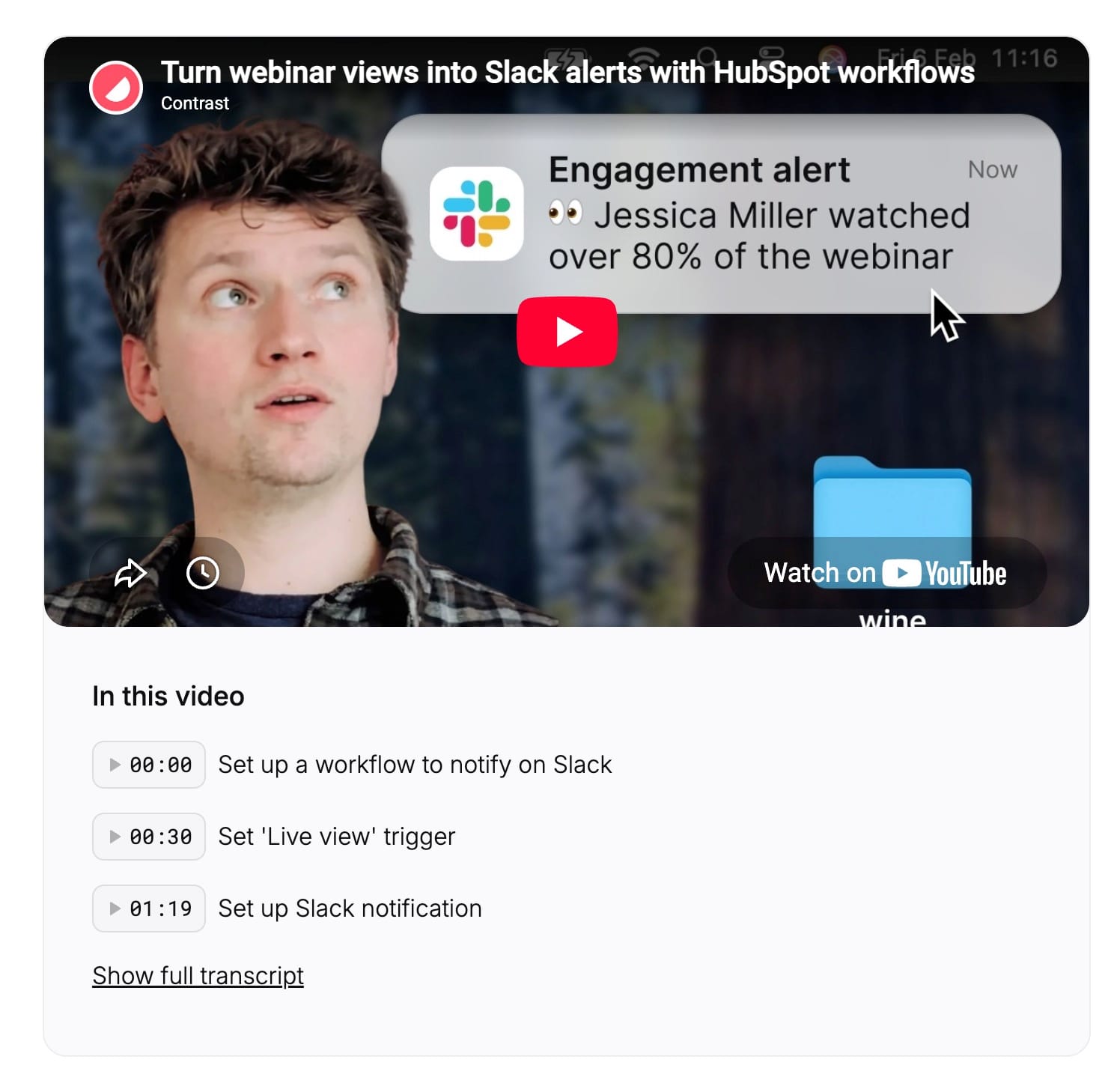
What should land in a rep's inbox is signals, not a spreadsheet of everyone who registered. A flat list of names tells a rep nothing about who to call first. A short list of who watched most of the session, what they answered, and what they asked tells a rep exactly where to start.
Final tip: decay the score and check it against real pipeline before you trust it
A score with no decay eventually lies to you. Someone who was highly engaged six months ago and has gone quiet since will still show up as immediate-outreach hot unless points erode without fresh activity. Subtracting points on a schedule, rather than letting a stale score sit at 90 forever, keeps the model honest. Combining fit with engagement matters here too: a high score built entirely from behavior, with no fit filter, produces noisy false positives that waste a rep's morning.
Why it pays to set up Lead Scoring in HubSpot
The proof that this is worth building is in what happens downstream, not in the point values themselves. At Pirani, the number of people opting into follow-up after a flagship event went from 19 to 190 in a single year, tracked directly against poll and Q&A engagement rather than raw attendance.
At Zefort, a custom HubSpot dashboard tracing registrant to deal showed webinars influencing roughly two-thirds of new pipeline, a number the team only discovered once engagement data was reaching HubSpot instead of staying inside the webinar platform.
This is why CRM integrations are crucial for running a successful and high performing webinar program. Take Zoom Webinars Plus computes something it calls an engagement score, built from watch time, polls, and chat activity. It just never leaves Zoom. The formula existing somewhere doesn't help a sales team if it's stuck in the wrong system.
Contrast webinars is the webinar platform that syncs over 50 data points to HubSpot, that you can then use in your favorite HubSpot features such as Workflows, Marketing Events and of course Lead Scoring.
Learn more how Contrast can help you run a better webinar program and book a demo today
FAQ
How does HubSpot lead scoring work?
HubSpot's native lead scoring tool assigns points to contacts based on properties and tracked events, then totals them into a Contact Engagement Score you can filter, list, and route on. Manual scoring uses criteria groups you define yourself; HubSpot also offers AI-based scoring on Marketing Hub Enterprise, which trains a model on your own converted and non-converted contacts instead of manual point assignment.
What's a good HubSpot lead scoring model for webinar leads?
A model that scores engagement and fit separately, then combines them, rather than treating attendance as a proxy for both. Registration and attendance form a baseline, with heavier points for depth signals like watch time above a threshold, poll answers, and keyword-filtered Q&A questions or CTA clicks.
How do I set up lead scoring in HubSpot for webinar events?
In HubSpot, go to Contacts → Actions → Manage Lead Scoring, create a Contact Engagement Score, and add criteria filtered by Integration Events rather than contact properties. Selecting the specific webinar event (attendance, poll vote, CTA click) and, where useful, filtering by property value keeps the score tied to what happened in a session.
Does HubSpot have predictive lead scoring?
Yes, on a Marketing Hub Enterprise subscription. HubSpot's AI scoring requires a minimum sample of 50 contacts, split between at least 25 converted and 25 non-converted, and trains a model on that history rather than using manually assigned points.
What's the difference between lead scoring and HubSpot lead routing?
Lead scoring assigns a number to a contact based on fit and behavior; lead routing decides what happens once that number crosses a threshold. A score with no routing attached just sits on a record, so the two need to be built together, with workflows or Slack alerts firing directly off the same event criteria that feed the score.
How often should I update or decay lead scores?
On a regular schedule, not just at setup. Subtracting points for contacts with no recent activity keeps scores from staying artificially high long after real interest has dropped off, and reviewing point values against what sales closes catches a model that's drifted from reality.
What are some real HubSpot lead scoring examples for webinars?
A workable example: 5 points for registering, 15 for attending, a further 15+ for watching over 70% of the session, 35 or more for answering a poll, and 50 for a poll answer that reveals ICP fit directly. Thresholds of 50, 75, and 90 points can mark MQL, sales hand-raise, and same-day outreach respectively, adjusted against what your own webinar lead generation strategy and pipeline data support. For a broader look at which webinar platforms sync this kind of data to HubSpot at all, that's worth checking before assuming the scoring criteria above are even available to you.