
Introduction
Say goodbye to tedious and overwhelming webinar preparations.
Revolving cogs and wheels, a Swiss timepiece's intricacy parallels planning hosting the perfect webinar. Each component, however seemingly insignificant, can't be ignored. It has to work in full unison with the rest, achieving fluid motion, seamless execution, and spectacular timing.
Eliminate the guesswork of seamless webinar creation with our definitive 2026 guide. Now, orchestrating this timepiece becomes an effortless process, almost as satisfying as hitting your first thousand attendees. Guesswork is a thing of the past, you now have the backstage pass to webinars that mesmerize, engage, and convert. With each tick, we move you closer to a triumphant webinar.
Step-by-Step Webinar Preparation: Ensuring a Smooth Execution
- Precision in identifying and understanding your audience
- How a captivating topic improves audience engagement
- The influence of strategic date and time selection on attendance
- The role of keen content preparation in maintaining audience interest
Identifying Your Target Audience: The First Step to A Successful Webinar
Without a clear understanding of your target audience, your webinar can lose focus and fall flat. Knowing your audience will not only guide your content creation, but also help tailor your presentation style, engagement hacks, and follow-up strategy.
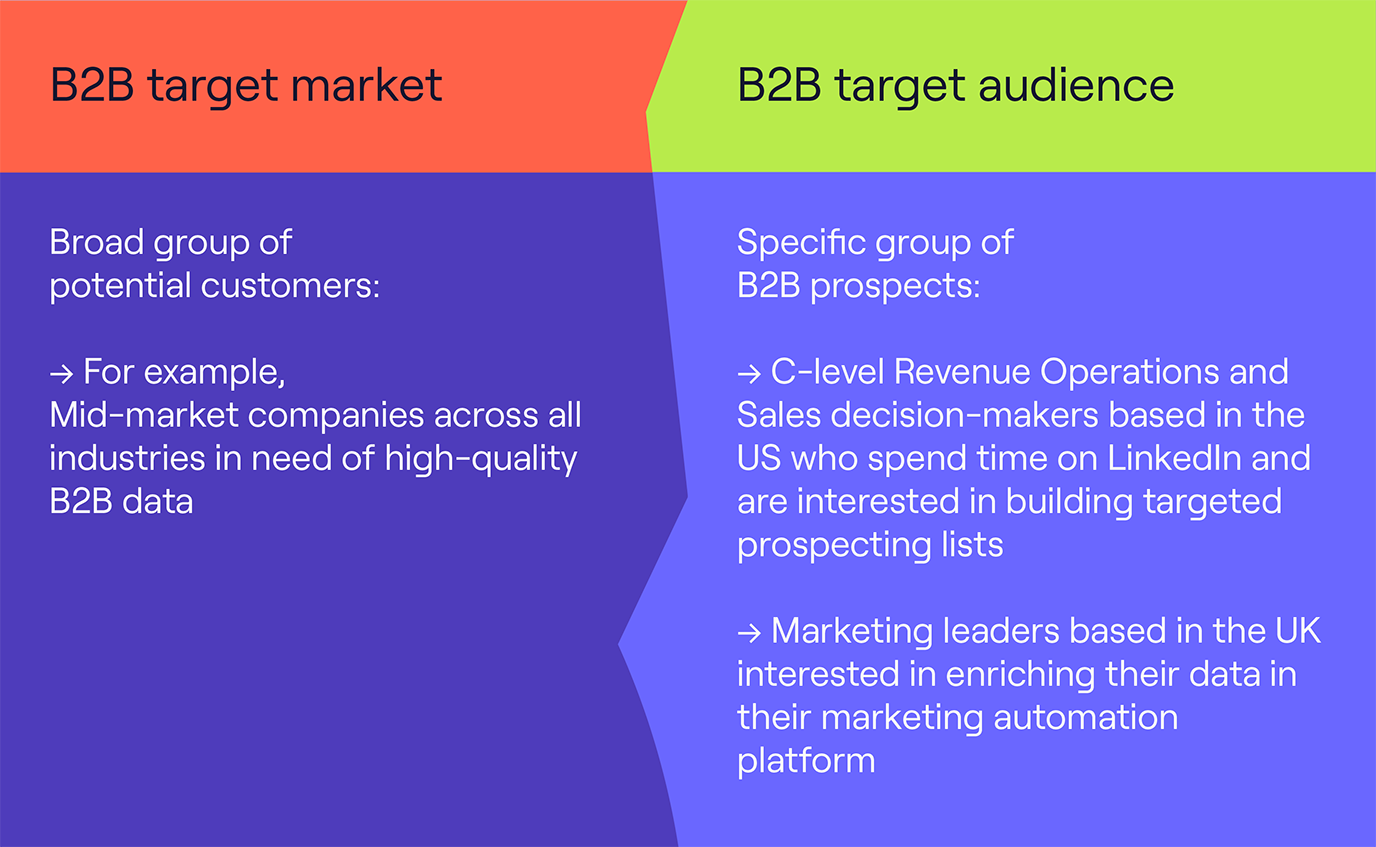
Identification should go beyond demographics - understanding their motivations, interests, and challenges can be the key to resonate your webinar with them. An appreciation of their time zones could also influence attendance.
Such thorough understanding enables more personalized, relevant, and valuable webinars- leading to satisfied attendees, higher engagement rates, and eventually more conversions.
Before you continue, check these off:
- Written a one-paragraph description of your ideal attendee (job title, industry, seniority level)
- Listed the top 3 challenges or questions your audience is trying to solve
- Confirmed the time zones your audience is in and noted any scheduling implications
- Checked whether your topic matches what this audience has engaged with before (past webinars, blog posts, emails)
Choosing the Right Topic: Engaging Your Audience Effectively
Just as a captivating book draws readers in, an engaging webinar topic will pull your audience towards attending the session. The topic you choose must be relevant to your audience, offering unique insights and solutions to their needs and pain points.
It's also valuable to consider the larger industry trends when finalizing your topic. Topics that complement these trends often serve as a magnet for audiences.
However, selecting topics that are part of larger, longer trends make for great evergreen webinars.
The apt topic can also encourage more social shares and higher search rankings.
Intriguing, thought-provoking, forward-thinking topics can stimulate discussions and viewer interaction - further elevating your webinar's effectiveness and making your event an unforgettable experience.
Before you continue, check these off:
- Choose a topic that directly addresses a challenge your target audience is actively trying to solve
- Validate the topic has search demand — check Google, LinkedIn or past email open rates for signal
- Confirm the topic isn't something you've covered in a recent webinar
- Check whether the topic ties into a current industry trend or conversation
- Write a working title that makes the value of attending clear in one sentence
Selecting the Perfect Date and Time: Maximizing Attendance
The date and time you choose for the webinar are influential in driving attendance levels. These should align with your audience's lifestyle, time zone, and work schedule.
For instance, mid-week days like Tuesday or Wednesday usually witness higher numbers of webinar registrants and attendance rates. Avoid public holidays or regular off days where possible. Think of it as a dinner party; you wouldn't host when your guests aren't available.
Timing can make or break your webinar attendance, so it deserves attention and thoughtful consideration. It sounds simple but holds much significance- a testament to its impact on webinar success.
Before you continue, check these off:
- Confirm the day of the week — Tuesday, Wednesday or Thursday are typically best for attendance
- Check for public holidays or major industry events that clash with your chosen date
- Pick a time that works for the majority of your target audience's time zone
- Set a date at least 2 weeks out to give enough promotion time
- Block the date internally so key presenters are confirmed before you announce
Preparing Engaging Content: Keeping Your Audience Hooked
Content is king - especially in webinars. The content you prepare should offer valuable insights, tangible takeaways, and practical solutions for your audience. Creating high-quality, engaging content will capture your audience's attention and help you get more out of your webinars. It should bond with the audience, keeping them engaged, intrigued, and demanding more.
Use storytelling to make complex issues digestible and keep the session lively. Incorporate interactive elements like Q&As, polls, quizzes, and real-time reactions.
Q&A on Contrast
Remember, the quality of your content can turn one-time attendees into recurring ones. It can get your webinar shared and liked more, extending your reach and enhancing your brand image. Hence, investing time and effort into content preparation can lead to rich dividends in the long run.
Before you continue, check these off:
- Structured your presentation with a clear opening, middle and close
- Written a slide deck with no more than 6 words per slide
- Added at least one poll question to run during the session
- Prepared 3 to 5 discussion questions to seed the Q&A
- Identified your key takeaway — the one thing attendees should leave knowing
- Rehearsed the full presentation at least once out loud
Essential Webinar Tools: Enhancing Your Webinar Experience
TL;DR:
- Pick webinar platforms tailored to your unique needs
- Leverage interactive features to maintain audience engagement
- Meet all technical requirements for a frictionless webinar experience
With the right preparation in place, as outlined in the previous section, the next crucial aspect to optimize is the webinar tool selection. The right tools can transform a lackluster presentation into a captivating one, pushing your webinar from good to great.
Let's delve into the essential webinar tools that will enhance your next webinar experience, ranging from choosing the platform, using interactive features, to meeting technical requirements.
Choosing the Right Webinar Platform: Catering to Your Specific Needs
Finding the ideal webinar platform is like shopping for the perfect pair of shoes - it should cater to your specific needs and comfortably fit.
A good platform is one that aligns with your goals, audience size, and feature requirements. If you're still comparing options, our guide to the best webinar software covers 15 platforms side by side with real user ratings. Today's market offers a plethora of such platforms, each presenting an array of features. High-quality video and audio, ease of registration, analytics, and ease of use are just but a few of the key considerations when on a quest for the right webinar platform.
Consider platforms that offer customization options, allowing you to brand your webinar and create that connection with your audience. When chosen right, the webinar platform can significantly bolster your communication and delivery execution.
Before you continue, check these off:
- Listed your must-have features (recording, polls, Q&A, custom branding, analytics)
- Checked the platform supports your expected audience size
- Confirmed the registration flow is simple and mobile-friendly
- Tested the platform with a trial run before committing
- Verified it integrates with your CRM or email marketing tool
The webinar platform built for engagement
Start for free with up to 50 registrants. No credit card needed.
Start for freeUtilizing Interactive Features: Engaging Your Audience
Interactive features are the lifeblood of any engaging webinar. Live polling, Q&A sessions, chat rooms, and screen sharing are some of these features designed to keep your audience's interest peaked.

The more interactive your webinar, the higher the chances of your audience sticking around till the end. Interactive tools also offer an excellent avenue for gathering feedback, driving discussions, and gauging the effectiveness of your presentation. While on this, it's important to ensure your choice of interactive tools aligns with your target audience's technical know-how to avoid complexities and frustrations.
Before you continue, check these off:
- Planned at least one poll with a clear, single-choice question ready to launch during the session
- Set up a Q&A module and decided whether questions will be answered live or in writing
- Tested screen sharing ahead of the session if you plan to demo anything
- Briefed co-presenters or moderators on how to manage chat during the live session
- Confirmed all interactive features work on the webinar platform before going live
Technical Requirements and Setup: Ensuring a Seamless Experience
Seamless webinar experiences hinge largely on the robustness of your webinar setup. This factor goes beyond having a reliable internet connection to encompass software, hardware compatibility, and backup plans.
Ensure your selected webinar platform is compatible with your hardware and runs smoothly across different devices your audience might be using. Always run a tech rehearsal prior to the webinar to eliminate any potential hiccups and test your camera and microphone.
Additionally, equip your audience with guidelines on the necessary setup, minimum system requirements, and what to do in case of glitches. When your technical base is solid, your webinar is set to run smoothly, enhancing the overall audience experience.
Before you continue, check these off:
- Tested your camera and microphone ahead of the session
- Confirmed you have a stable wired internet connection or strong wifi signal
- Checked your webinar platform runs smoothly on the device you will present from
- Sent attendees a setup guide with minimum system requirements and what to do if they have trouble joining
- Prepared a backup plan if your tech fails — a co-host who can take over or a recording ready to share
Webinar Promotion Strategies: Maximizing Attendance
- Design a captivating registration page to woo your attendees.
- Make the most effective use of email marketing to keep your audience in the loop.
- Harness the power of social media to expand your audience sphere.
Being a jack of all webinar tools, as we have discussed in the previous section, doesn't necessarily transform you into the master of webinar marketing. A compelling webinar certainly does need an efficient toolset, but triggering excitement and anticipation among your potential attendees is a craft of its own.
Creating a compelling registration page: Attracting your audience
Your registration page is your first introduction. This is where you get your first chance to convince your audience why your webinar is the event to set their calendar for.
The page should project what attendees could get out of it. It doesn't have to be an artistic wonder, but it MUST deliver a simple, clean, and engaging experience. Keep the registration process quick with minimum fields.
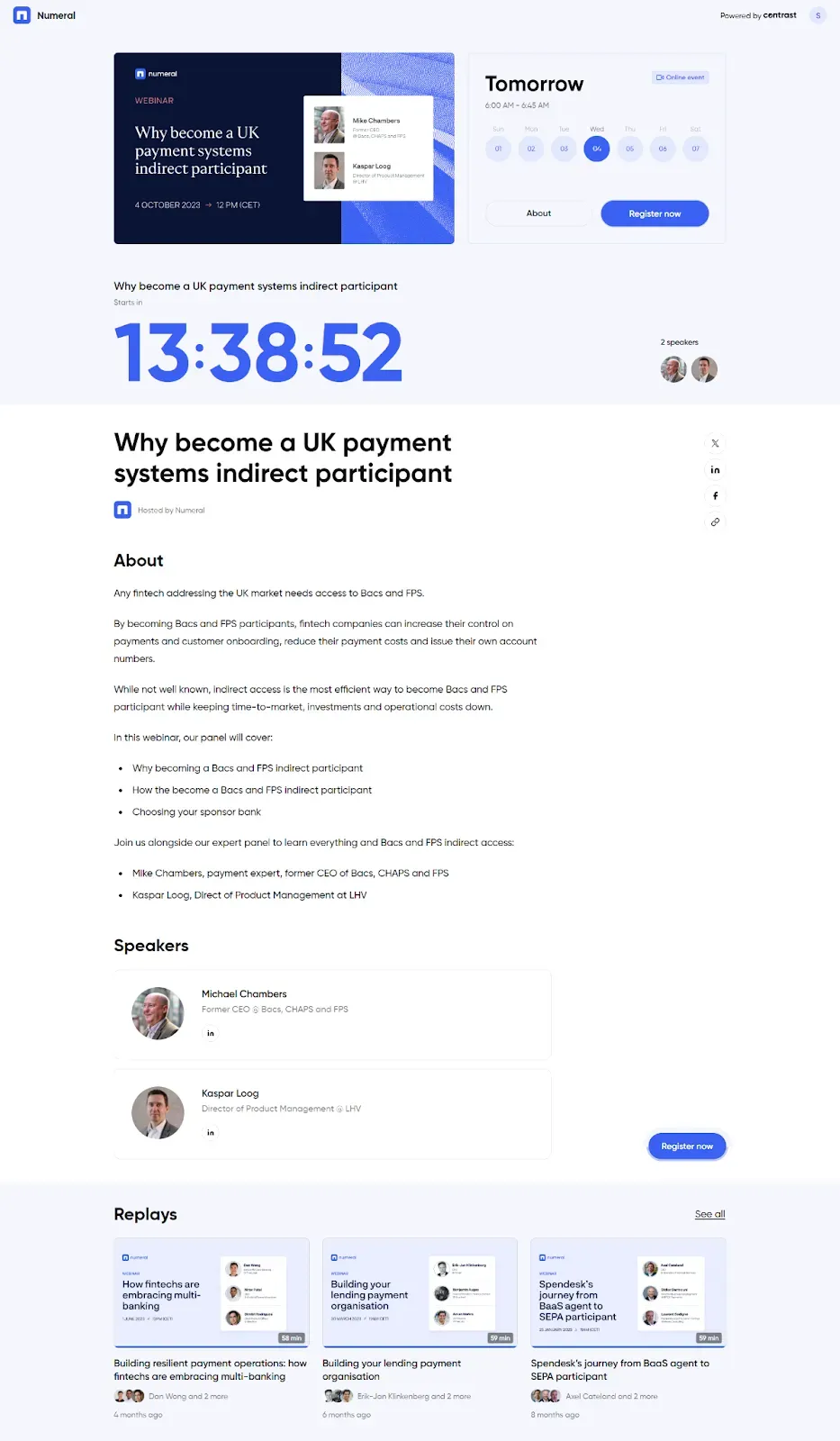
Add a touch of personalization whenever possible. For instance, you can embed videos to introduce the speaker or give a brief idea about the topic. Remember, the registration page should not be an obstacle. Its job is listening to the user confirming, "Yes, I am interested, tell me more!". Thus, the design should reflect the value proposition you are offering to the attendees.
Before you continue, check these off:
- Written a headline for the registration page that clearly states the benefit of attending
- Kept the registration form to 3 fields or fewer (name, email, company is usually enough)
- Added a short bio or photo of the speaker to build credibility
- Included the date, time and duration prominently so attendees know what they're committing to
- Tested the registration page on mobile to confirm it loads and submits correctly
Leveraging email marketing: Keeping your audience informed
59% of marketers consider email as their most effective channel in terms of ROI. This reveals the potential of emails as not only a medium for communication but also an impressive promotion tool.
Webinar email invitations are still the #1 tool used by marketers to drive webinar registrations. Tailoring emails announcing your webinar, taking care with subject lines, valuable content and CTAs can keep the engagement rate on a high side.
Emails give the advantage of setting up automatic reminders for those who have already registered. These reminders can be scheduled for one week, one day, and even one hour before your webinar starts, ensuring that your event stays fresh in the minds of your audience.
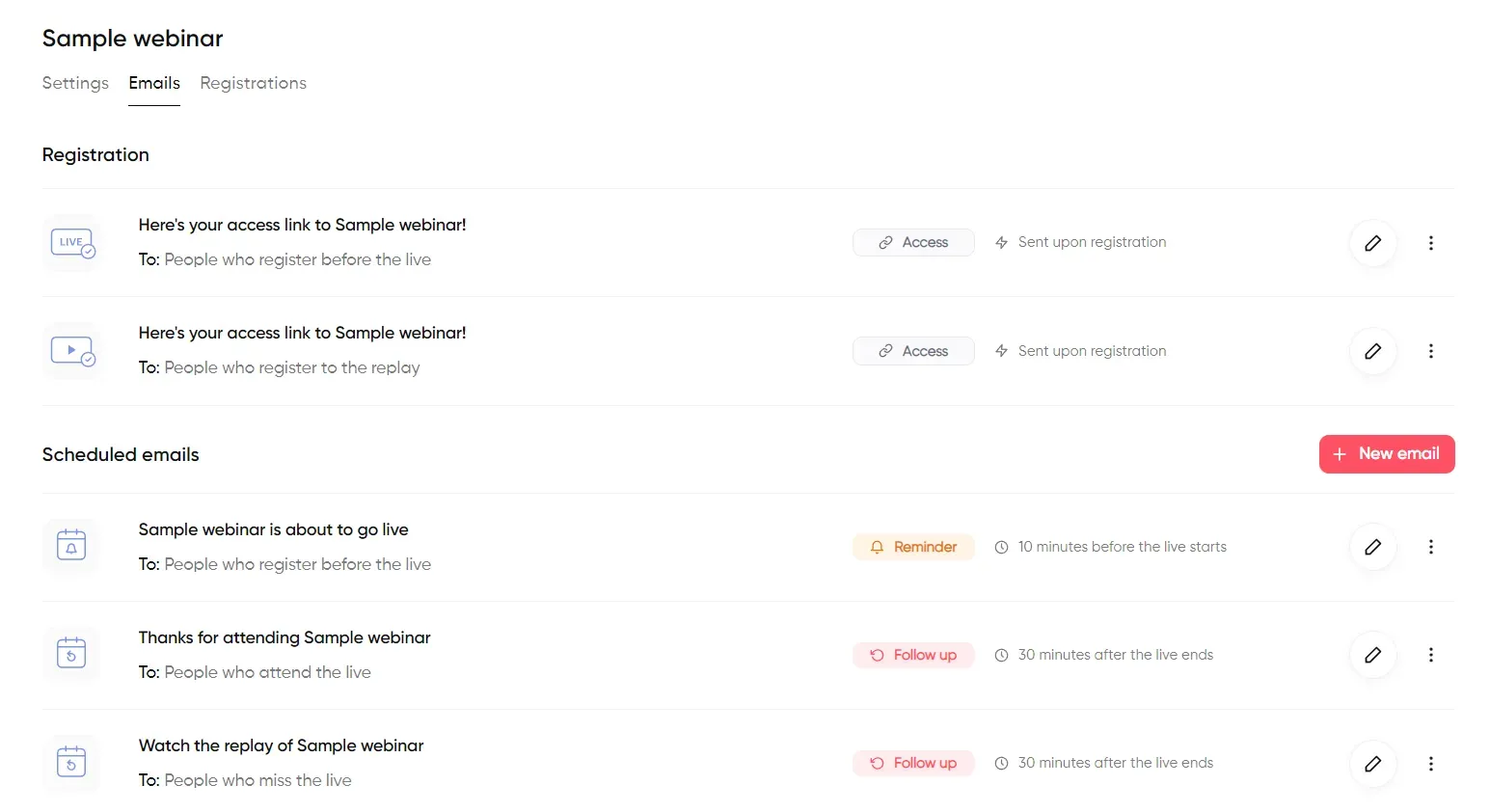
Besides reminder emails, personalized follow-up emails have a dual advantage. That is, gauging feedback from attendees, and keeping non-attendees in the loop by sharing webinar recordings or important takeaways. In the email marketing world, every open click counts, making it a tool not to be overlooked in webinar promotion.
Before you continue, check these off:
- Written a webinar invitation email with a clear subject line and single CTA
- Set up at least two reminder emails — one week before and one day before the webinar
- Scheduled a follow-up email for after the session with the recording link and key takeaways
- Segmented your email list so the invite goes to the most relevant audience
- Tested all emails render correctly on mobile before scheduling
Utilizing social media: Expanding your reach
The ubiquity of social media today is undeniable. And social media promotion for your webinars is a must-do. Start with posting about your upcoming webinar on your social channels. But, don’t limit it to just announcing; providing a sneak peek into the content or the guest speaker can build interest.
Social media channels vary in terms of the audience, engagement, and formats. Tailor your content that matches the style and audience of each channel. For instance, a professional tone on LinkedIn, casual on Instagram.
Don't ignore the power of hashtags and paid promotions to amplify your reach further. While the former can create online chatter around your webinar, the latter can enable you to target potential attendees based on their interests and online behavior, making social media a marketer's playground.
Being creative and strategic in your webinar promotion can boost attendance rates significantly. Strong promotion is only half of the equation, running a successful webinar on the day requires its own preparation, from the dry run to the post-event follow-up. And a greater number of attendees means a broader scope for networking, learning, brand promotion, and even lead conversion. After all, the value of a webinar lies in the level of engagement and interaction it can foster.
Moreover, the learnings and reminders from your webinar do not end the moment it does, which brings us to the importance of a proper follow-up. After all, the ultimate goal is not just delivering a successful webinar but making it impactful.
Before you continue, check these off:
- Written at least three social posts about the webinar — one announcement, one content teaser and one last-chance reminder
- Tailored the copy for each platform (professional tone for LinkedIn, more casual for others)
- Added the registration link to every post
- Scheduled posts in advance so promotion runs consistently without manual effort
- Planned one post for the day of the webinar to catch last-minute sign-ups


The Webinar Platform Built For Engagement
Start for free up to 30 registrants. No credit card needed.
Start for freePost-Webinar Follow-up: Maintaining Engagement
- Leverage thank you emails as an appreciation tool
- Share your webinar recording to provide continuous value
- Collect feedback for the enhancement of future webinars
Sending out Thank You Emails: Showing Appreciation
After a webinar, sending out thank-you emails is more than a common courtesy. It's an engagement tool, a conversation starter, and a simple but effective way of appreciating your attendees. Thank-you emails allow you to reinforce the key points of your webinar, remind attendees of follow-up resources or actions, and build an ongoing relationship with your audience.
A well-crafted thank-you email is punchy, personalized, and direct, focusing on the recipient rather than the sender. Avoid generic phrases and template responses—instead, make sure to highlight key takeaways from the event and anticipate some of the questions they might have.
Before you continue, check these off:
- Sent a thank you email to all attendees within 24 hours of the session ending
- Included a link to the on-demand recording in the email
- Highlighted the 2 or 3 key takeaways from the session
- Sent a separate email to registered attendees who did not show up with the recording link
- Included a clear next step or CTA — a demo, a related resource or the next webinar
Sharing the Webinar Recording: Providing Value
Although the ideal scenario would be for all your attendees to be present during the webinar, scheduling conflicts may prevent some from doing so. It’s in these situations that sharing and on-demand webinar recording proves particularly valuable. Not only does it allow attendees who missed the event to catch up, but it also gives those who participated an opportunity to revisit any concepts they found particularly intriguing or complex.
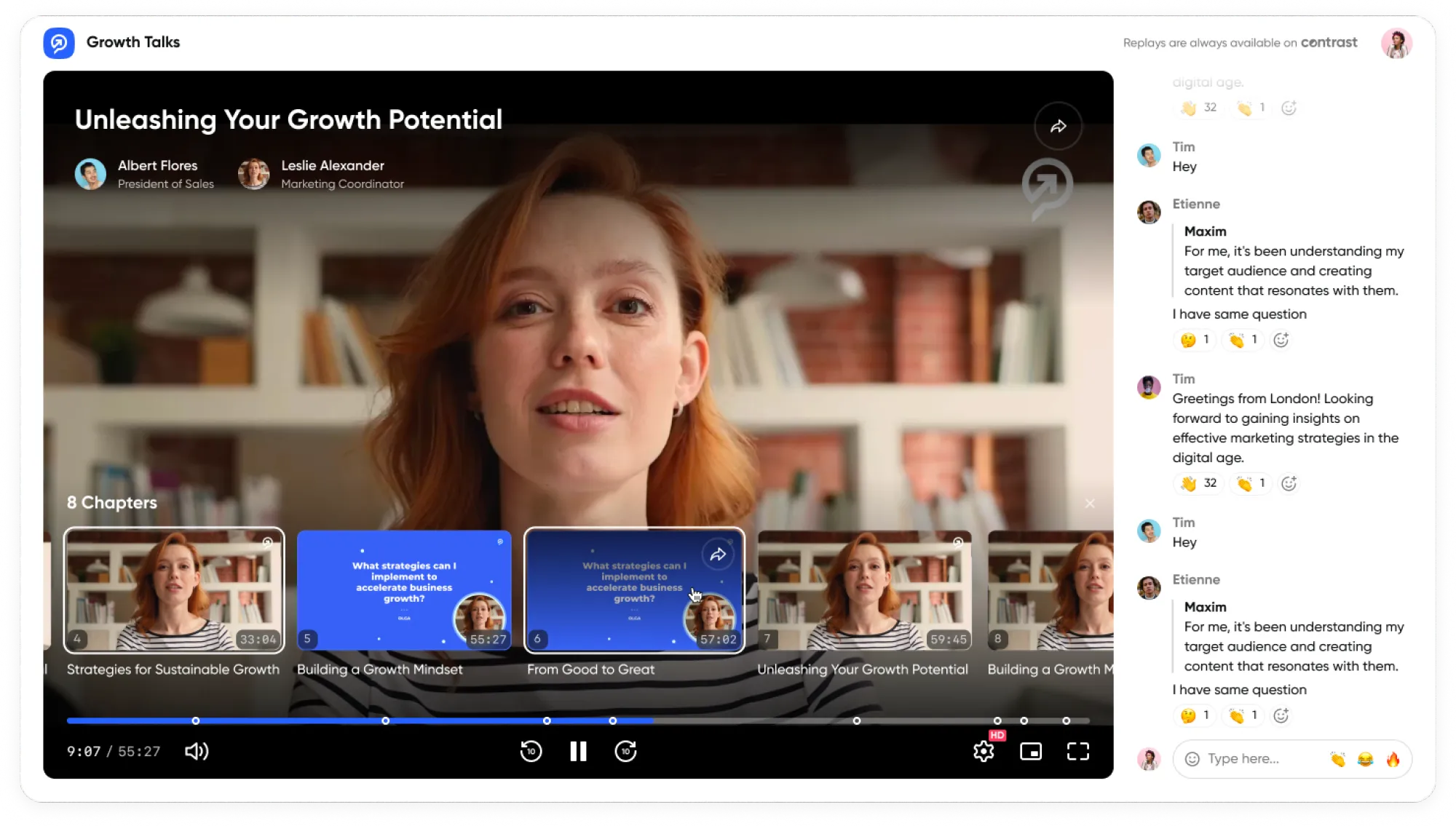
Your webinar is more than a one-off event. Owning a recorded copy of your webinar allows you to continuously provide value to your audience. Sharing the webinar recording further underscores the value you provide and continues to build trust and engagement with your audience.
Before you continue, check these off:
- Uploaded the recording to your webinar platform or video hosting tool within 24 hours of the session
- Sent the recording link to all registrants, both attendees and no-shows
- Added a clear title and description to the recording page so it can be found via search
- Set the recording as on-demand so new visitors can watch it at any time
- Added a CTA on the recording page to drive the next action (sign up, book a demo, register for the next webinar)
Gathering Feedback: Improving Future Webinars
Feedback is pivotal to the success of any organization, and webinars are no exception. By gathering attendee feedback, you can gain valuable insights into what worked in your webinar and, perhaps more importantly, what didn’t. Understanding your strengths and weaknesses from the perspective of an attendee can provide the catalyst for necessary improvements in future webinars.
As feedback is often accompanied by constructive criticism, it’s valuable in refining your webinar presentation skills, content, delivery, and overall effectiveness. Furthermore, initiating feedback collection often conveys a desire to listen and improve, further cultivating trust and participation from your audience.
In summary, effective post-webinar surveys are a critical component of webinar planning. This includes sending thank you emails as an appreciation tool, sharing the webinar recording to provide additional value, and gathering feedback to improve future webinars. Awareness and strategic execution of these steps can significantly improve engagement with your audience.
Before you continue, check these off:
- Created a post-webinar survey with no more than 5 questions
- Sent the survey within 24 hours of the session while it is still fresh in attendees' minds
- Asked at least one open-ended question so attendees can flag something you might not have thought to ask
- Reviewed the feedback before your next webinar and noted at least one thing to change or improve
- Shared feedback highlights with your team or co-presenters
Repurposing your Webinar Content
Repurposing a webinar into a week's worth of diverse and engaging content is a masterstroke in maximizing your webinar ROI.
Start by segmenting the webinar into bite-sized videos, each focusing on a key topic, perfect for sharing on social media platforms to drive engagement.
Transcribe the webinar to create an in-depth blog post or a series of articles, enhancing your website's SEO with rich, relevant keywords.
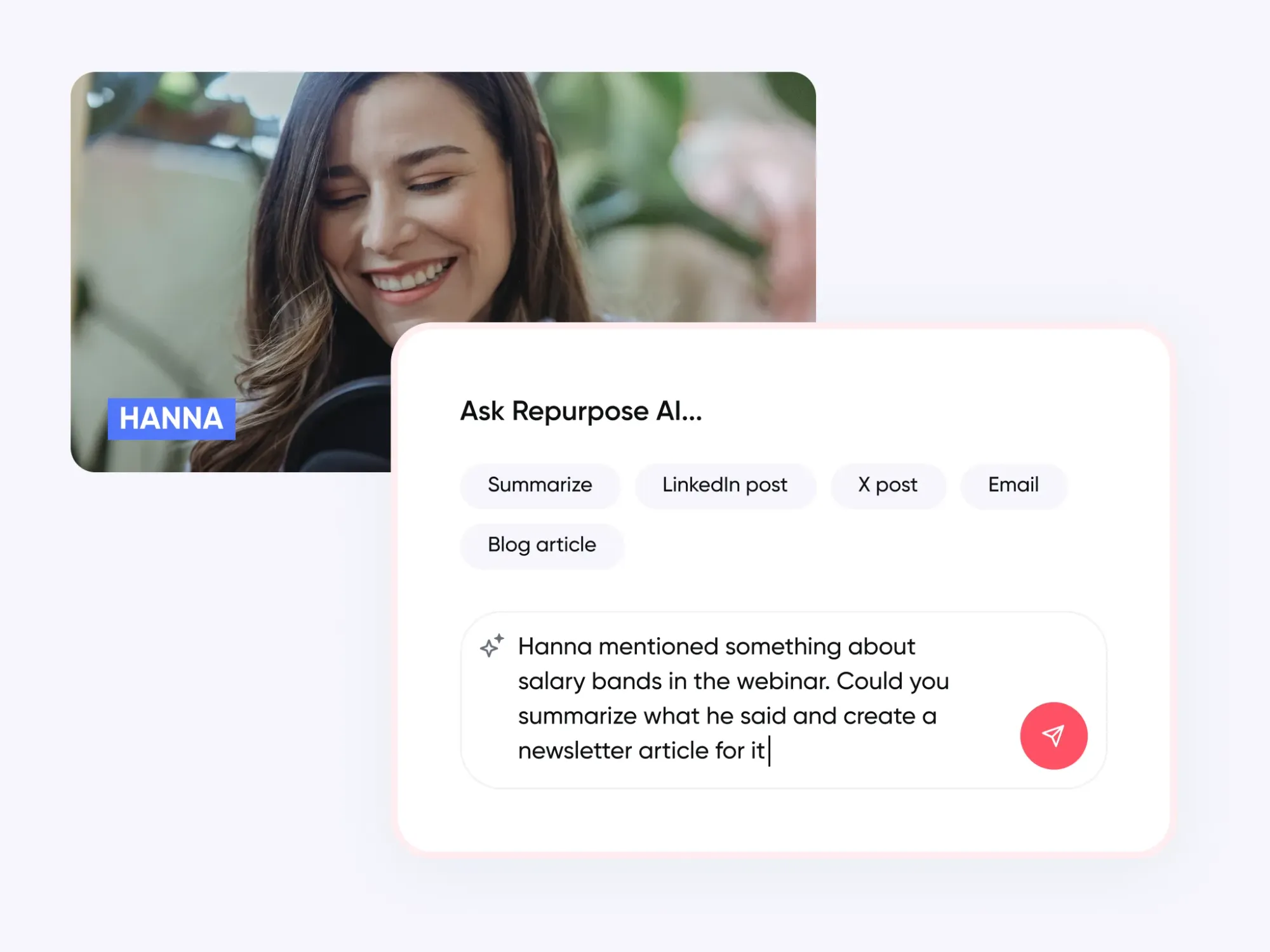
Extract compelling quotes and insights for eye-catching infographics or thought-provoking social media posts.
Host a podcast episode where you delve deeper into the webinar's subject, offering a fresh perspective or additional commentary.
By diversifying the format and platforms, you not only cater to different audience preferences but also significantly boost your online presence, making every minute of your webinar work harder for you.
Before you continue, check these off:
- Clipped at least 3 short video highlights from the recording for social media
- Transcribed the session and turned the key points into a blog post or article
- Extracted 3 to 5 quotes or stats for use as social media posts
- Identified whether any section could be expanded into a standalone guide or resource
- Added the recording to your content library so it continues to generate views over time
Repurpose every webinar into a week of content in minutes
Start for free with up to 50 registrants. No credit card needed.
Start for freeMeasuring Webinar Success: Understanding Your Impact
- Gauge the buzz with attendance rates
- Measure how captivating you were via audience engagement
- Check the impact of your call-to-action with post-webinar actions
Analyzing Attendance Rates: Gauging Interest
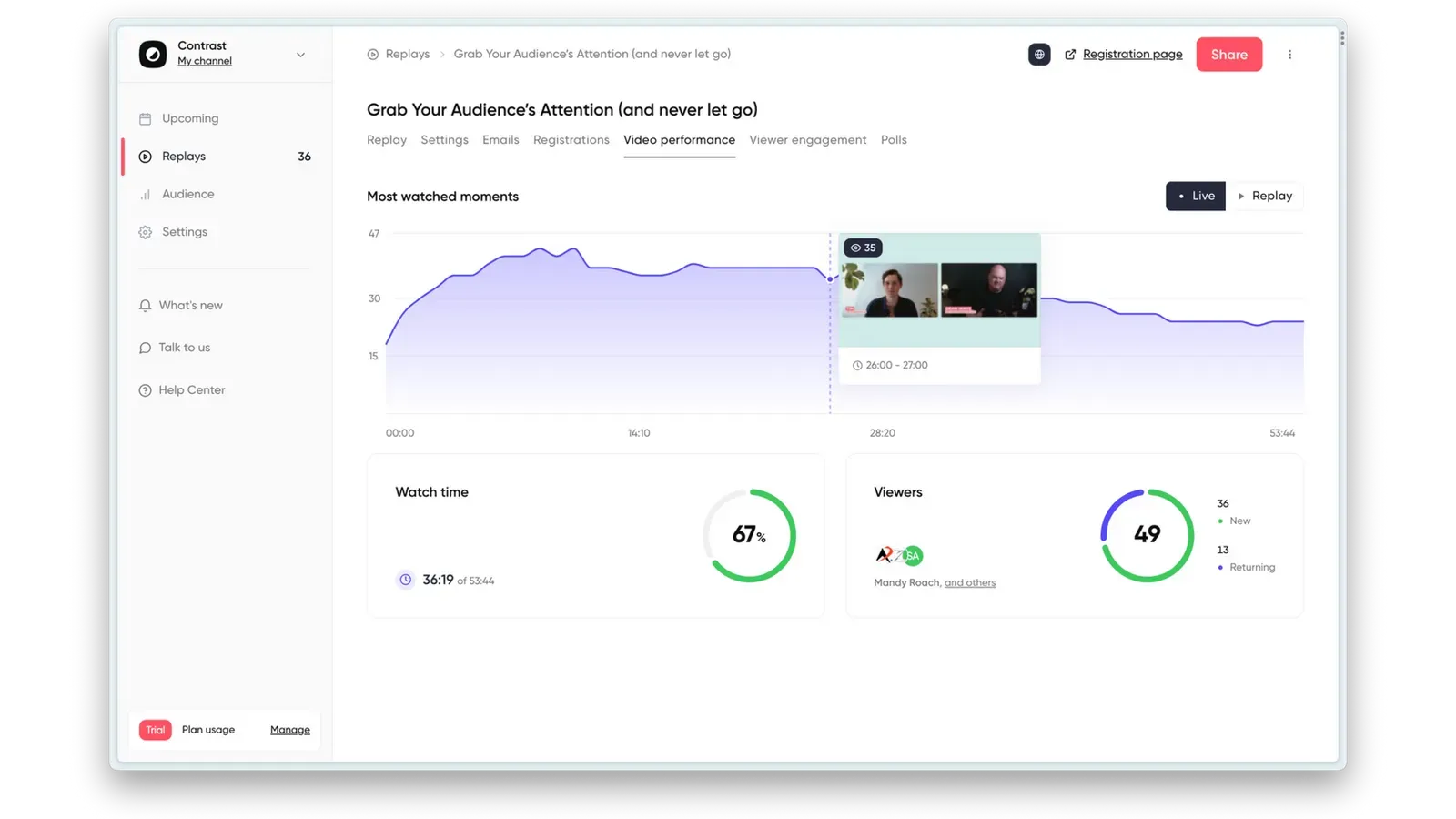
Attendance rates are one of the critical webinar KPIs to measure success. A large turnout signifies interest in your topic, proving that you've hit a hot button in your industry or sector. On the contrary, a small crowd reveals a mismatch between your buyers and your subject matter. However, it's not just about the number of virtual seats filled.
- Are more people signing up for your webinar than are actually attending?
- Are people dropping out halfway through or staying until the end?
By analyzing your attendance rates in detail, you can understand your potential customers better and cater to their interests more effectively.
Evaluating Audience Engagement: Measuring Success
Audience engagement is the soul of a successful webinar. You need to explore how your audience interacted during your presentation. Digging deeper into the level of interaction helps you pinpoint areas of your webinar that were engaging and those which need an overhaul.
Assess the number and nature of questions asked, the poll participation rates, and the chat activity. All of these webinar metrics should be tracked and measured for every webinar. Evaluate the feedback received from your audience as well. This valuable data can guide you to create engaging webinars centered on your audience's needs and questions.
Tracking Post-Webinar Actions: Assessing the Effectiveness of Your Call-to-Action
A stunning webinar can still fall flat without a clear, compelling call-to-action (CTA). Your CTA is the magnet that attracts further engagement and potential conversions post-webinar. This is why tracking post-webinar actions is crucial.
Measure the success of your CTA by looking at the rate of post-webinar actions such as:
- Downloads of the presentation
- Signups for the next webinar
- Email inquiries about your products or services
- Website traffic surge
By evaluating this data, you can effectively assess the potency of your CTA and determine what works best for your target audience for future webinars.
Before wrapping up, check these off:
- Pulled your attendance rate (attendees divided by registrants) and noted it for benchmarking future webinars
- Reviewed engagement metrics — poll participation, questions asked and chat activity
- Checked your drop-off rate to identify which part of the session lost the audience
- Measured post-webinar actions — recording views, CTA clicks, demo bookings or sign-ups
- Sent or reviewed your post-webinar survey results
- Documented what worked and what to change before your next webinar
Forging Ahead with Your Webinar Masterplan
Remember, quality webinars aren’t built overnight. Start with a compelling theme, locate your target audience, design engaging content, test your tech and promote with gusto.
What you've read offers the pivotal blueprint to construct interactive webinars that impress, engage and convert. The power of webinars extends beyond direct conversions; they play a big role in nurturing long-term relationships with customers.
Your journey from pre-production to post-webinar follow-ups is paramount to producing a successful webinar in 2026. There’s no time to hesitate - implement these lessons today to transform your webinars into a powerhouse of lead generation.
A thought to ponder on, how might your company specifically benefit from integrating these updated 2026 strategies into your webinar design?
And don't forget to try Contrast for the easiest webinars to market, with all the metrics you need in-built.
The Webinar Platform Built For Engagement
Start for free up to 30 registrants. No credit card needed.
Start for free