If you've spent any time on LinkedIn lately, you've seen the claims: "my marketing is fully automated," "my lead gen runs itself," every post paired with a screenshot of a ChatGPT prompt that says "Act as a world-class marketing strategist." Ask the person posting it to show you the actual workflow, the actual output, the actual results, and the trail usually goes cold.
This guide is the opposite of that. It's built from a live session where Ahrefs' marketing team showed the real workflow: 5 AI agents their marketers use daily, the tools underneath them, the exact steps each one automates, and the exact steps they deliberately kept manual.
The core problem this guide solves: marketers know AI can automate something, but most guidance is either too vague ("use AI to boost your marketing!") or too hype-driven (unrealistic 10x promises with no process behind them). Nobody shows the actual pipeline.
Who it's for: content marketers, SEO leads, product marketers, and marketing ops people who run repetitive processes — keyword research, competitive tracking, content production, webinar/event analysis, community monitoring, and want a real blueprint instead of a hype cycle.
After reading this guide, you'll be able to:
Tell the difference between marketing tasks that are safe to automate and tasks that should stay human using a simple test instead of guesswork
Build (or adapt) 5 working AI agent workflows: keyword research and opportunity scoring, AI brand perception monitoring, end-to-end content production, webinar/event analytics, and community listening on Reddit
Avoid the most common data-privacy mistake marketers make when feeding data into AI tools
Set up a realistic, phased plan to start automating your own repetitive marketing work this month
The one rule behind every agent in this guide
"AI adoption is about taking the really boring, well-known, well-processed, well-documented processes that you continue to do over and over again — and looking for how AI can help automate and streamline those existing processes." — Constance Tan, Product Marketing Manager at Ahrefs
That's the filter every workflow below passes through. None of these agents write from a blank page, invent a brand-new idea, or make Ahrefs' final content or strategy decisions. They remove the repetitive, well-documented steps around those decisions so the humans have more time for the parts AI still can't do.
Why Most "AI Marketing Automation" Advice Is Hype (And What Isn't)
Before looking at any of the five agents, it's worth being explicit about the philosophy behind them, because it's the opposite of most "AI will 10x your marketing" content circulating right now.
"I personally am not a believer that AI can immediately 10x your marketing. I'm more of a believer that the thing you weren't able to do before because you needed an engineer, or a video editor, to make even the basic stuff — now you can do way more of that with AI. Or you can automate some really boring thing, and actually focus your effort on the cool part of marketing: experimenting, creating new kinds of work, and solving people's problems." — Constance Tan, Product Marketing Manager at Ahrefs
That reframes the whole exercise. AI agents in marketing aren't here to replace marketers, they're here to remove the specific, well-documented, repetitive tasks that used to eat the hours you needed for strategy and experimentation.
What AI is actually good at (and what it isn't)
This distinction shows up in every one of the five agents, so it's worth stating plainly:
AI is good at
AI is not good at
Existing, well-documented workflows and processes
Finding genuinely new, original ideas
Repetitive filtering, scoring, and tagging tasks
Judging whether something is interesting or meaningful to a specific audience
Summarizing and analyzing large volumes of existing data
Original research, customer polling, or proprietary experiments
Applying a rubric you've clearly defined, consistently
Deciding which of many "correct" outputs is actually worth publishing
"AI is not very good at this kind of nuance at all. And I don't think this is the part that marketers should automate. You should have tried to develop this sense of what could be an interesting thing people want to talk about, or that would help people solve a problem." — Constance Tan, Product Marketing Manager at Ahrefs
The Automation Test: What Should You Actually Hand to AI?
Across all five workflows in this guide, the same pattern repeats when deciding what to automate and what to keep manual. Use it as a quick test before you build anything.
Automate it if...
It's repetitive and requires no original thinking. If you (or your team) do the exact same multi-step process every single time, with no creative judgment involved, it's a strong automation candidate.
It's a well-documented, existing process. AI performs best on tasks that are well understood and well written-about.
It's filtering, scoring, or tagging against a rubric you can define explicitly. If you can write down the exact criteria a human would use, AI can apply that same rubric at scale.
Keep it manual if...
It's the final decision on what to prioritize.
It requires knowing what's genuinely new or interesting to your specific audience. AI's base is existing information, so it struggles to originate something people will want to share.
It involves public trust — replying to real people in a community. More on this in the Reddit use case, but it's a hard line across every agent in this guide.
It needs a product or strategy decision. If an AI-run analysis surfaces a gap, a human still decides whether that's a content fix, a positioning fix, or an actual product change.
Before you feed anything into an AI tool: scrub personally identifiable information first. If you're analyzing customer, attendee, or user data, remove names and email addresses before it goes anywhere near an AI platform. Data sitting inside a third-party AI tool can potentially be used for training, and it can leak. This is a "no matter what you do" rule, not a nice-to-have.
Agent #1: The Keyword Research & Opportunity Scoring Hub
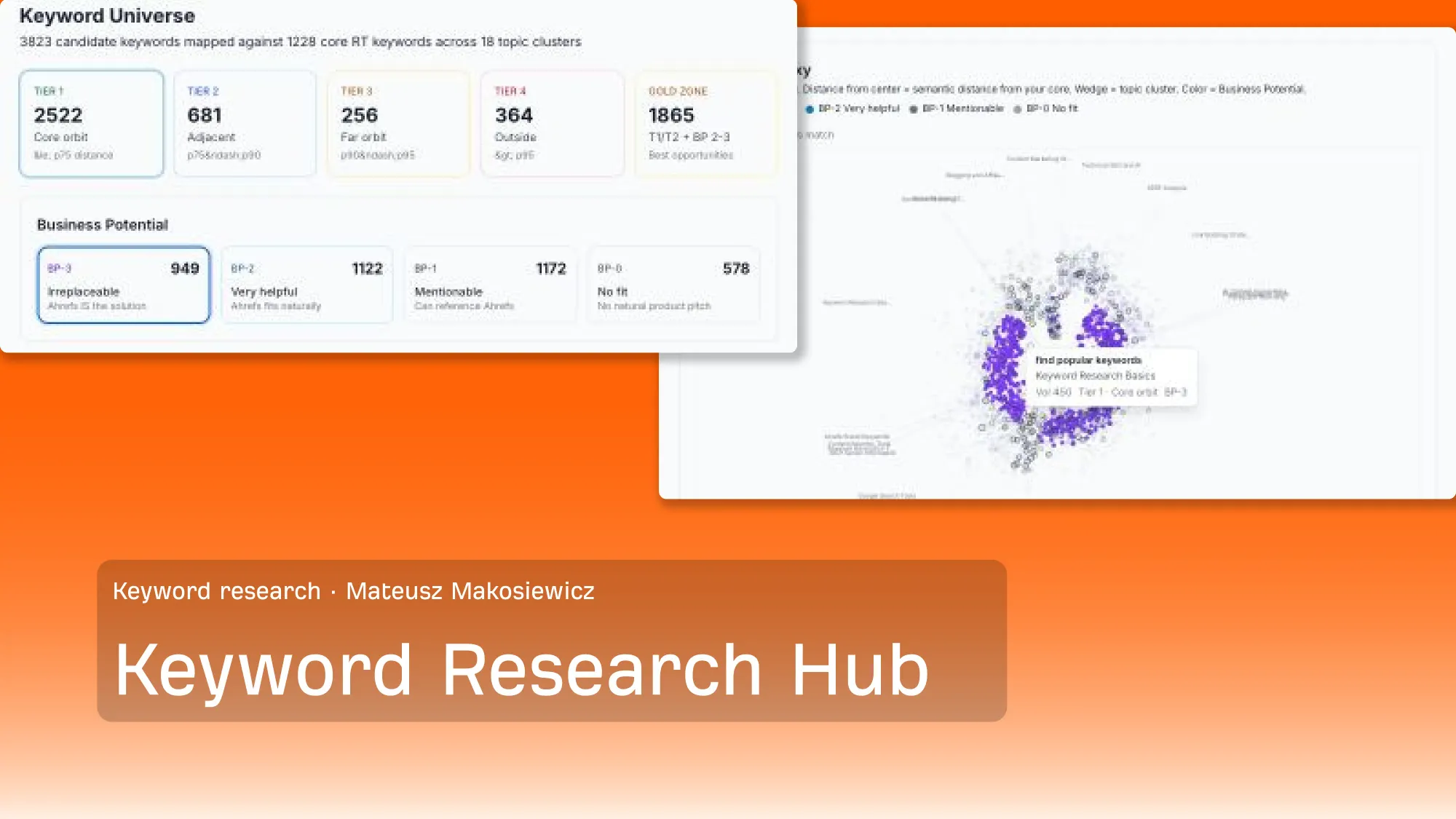
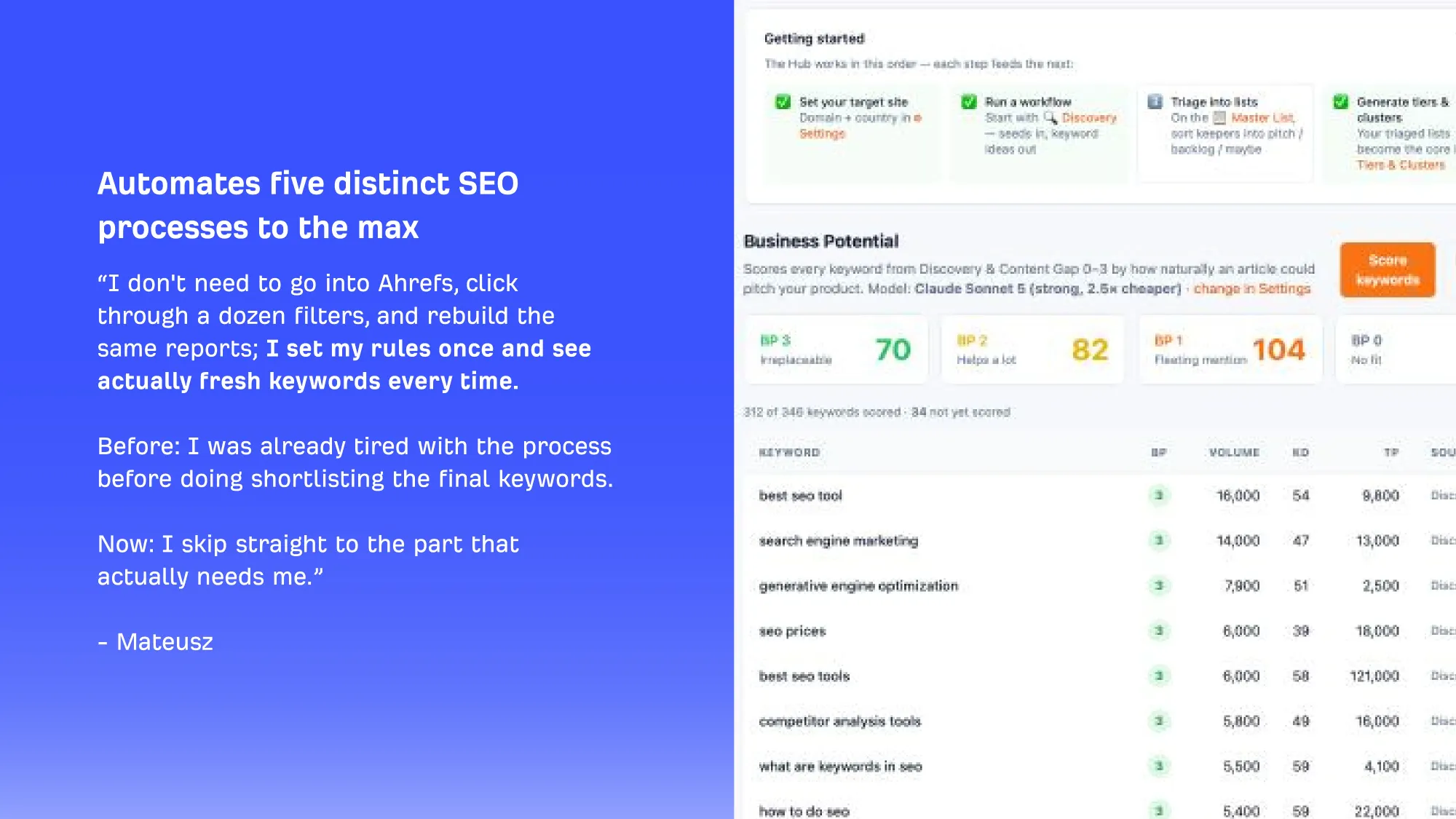
The problem it solves: before this agent existed, every new content project started with the same tedious ritual — pulling keyword ideas from Ahrefs' own tool, filtering them down manually, and applying rough sentiment or business-relevance judgment by hand. Even with API access, a human still had to do the filtering. By the time you'd finished, you were already tired of the topic before you'd written a word.
The 5 things it automates
Find keywords competitors rank for that you don't — a standard content-gap workflow, now running automatically.
Find all matching, related, and suggested keywords from a base list of seed keywords — pulling from Keywords Explorer's three keyword-idea reports so you go from a handful of seed terms to a full universe of related opportunities.
Find keywords where your own pages rank position 30 or lower and flag whether that page needs a rewrite, a merge, or a full replacement — especially useful for older content that's simply outdated (blogs that only talked about "SEO" now need to talk about AI search, for example).
Score every keyword by Business Potential — see the rubric below.
Find keywords where your pages are declining in rank and flag them for a refresh or rewrite before they fall further.
Keyword research hub
The Business Potential scoring rubric
This is Ahrefs' own internal scoring system for deciding whether a keyword is actually worth targeting.
Score
Meaning
Example logic
3 - Irreplaceable
Your product or solution IS the answer
The searcher needs a tool exactly like yours to solve this — there's no other way
2 - Very helpful
Your product solves part of the problem
Your solution helps significantly, even if it's not the entire answer
1 - Mentionable
Related, but solvable many other ways
You can reference your product, but it's not essential to solving this
0 - No fit
Your product doesn't solve this at all
No natural product mention makes sense
How to set this up yourself:
Write an explicit, detailed description of what your product or solution actually does. The more explicit you are, the more accurate the AI's scoring will be.
For each keyword or AI prompt, have the model identify search intent: is this person trying to learn, compare options, buy something, or watch a tutorial?
Ask the model: can your product/category of tool solve this problem, partially solve it, or not solve it at all?
Weight bottom-of-funnel, purchase-intent queries higher when they land in the "irreplaceable" tier. These are your highest-value opportunities.
Treat AI's scoring as a filter, not gospel. It will get some calls wrong, the point is narrowing thousands of keywords down to a shortlist a human can review quickly.
Keyword research hub scoring
What stays human
After every automated stage runs, there's still a final master list, and a person still goes through it. The repetitive filtering is done, but the decision of which keywords to actually write about, and what angle to take, stays with the writer. As Mateusz put it: the automation clears the "lame boring stuff," not the judgment call at the end.
No proprietary tech required: Ahrefs' internal version runs on their own AI agent platform (Letaido), but every step is achievable with Ahrefs' API or MCP server directly against Keywords Explorer's standard endpoints — you don't need any special access to replicate this.
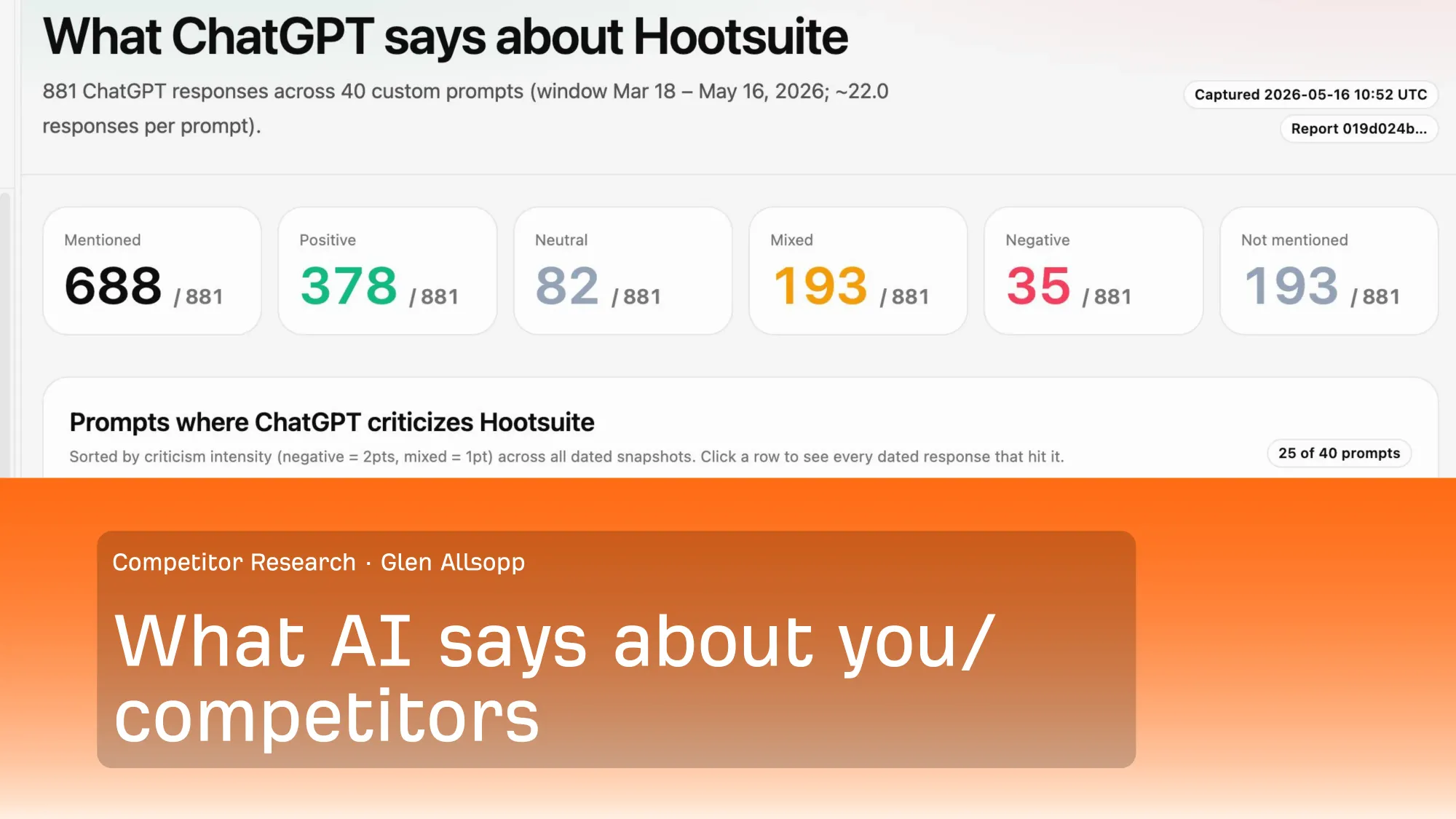
The problem it solves: more and more buyers are asking AI chatbots what's "best" in a category before ever visiting a website. If you don't know what ChatGPT, Gemini, and other models are actually saying about your brand versus your competitors, you're flying blind on an increasingly important channel.
How it works
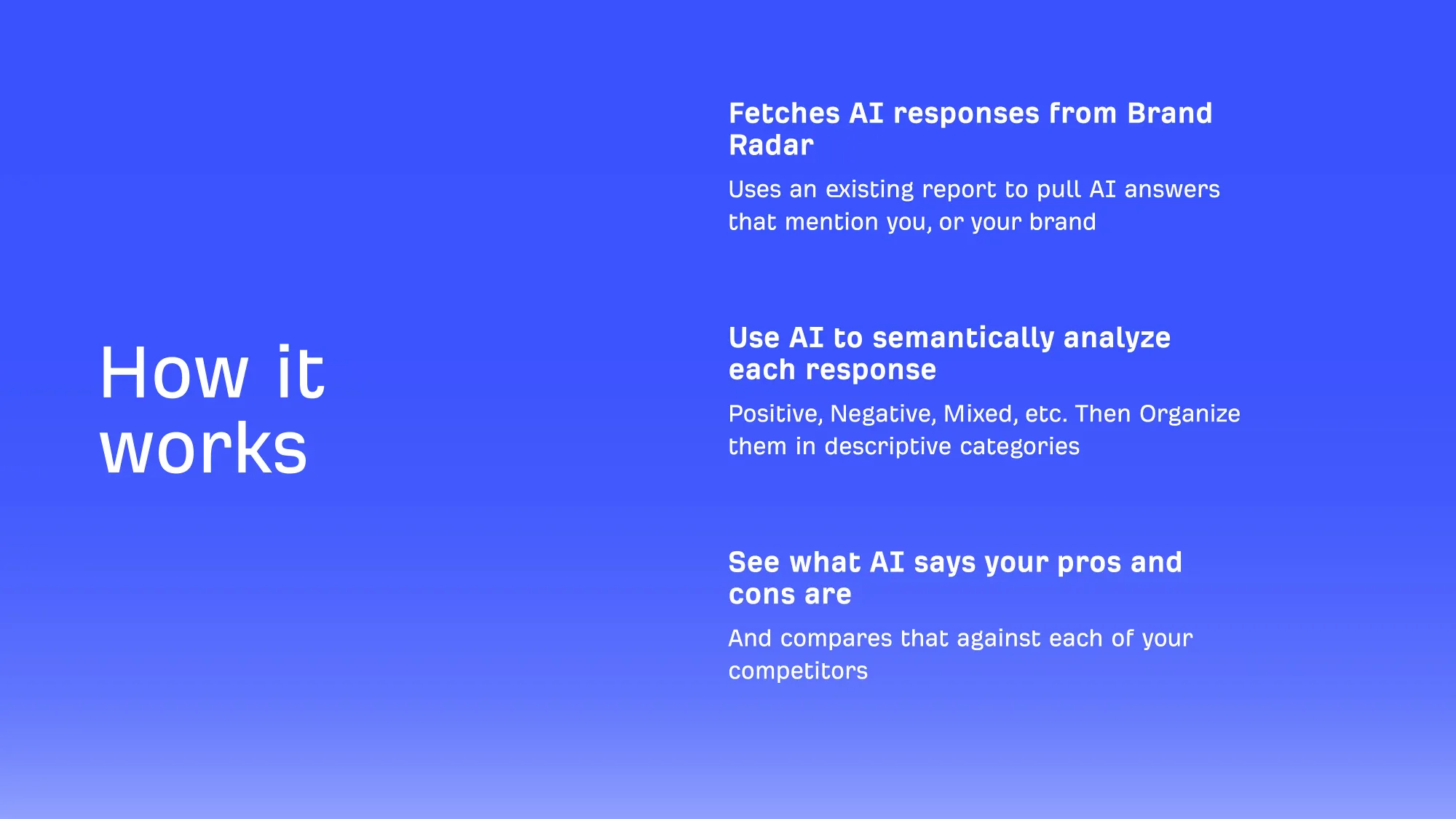
Fetches AI responses from an existing brand-monitoring dataset (Ahrefs uses their own Brand Radar tool) — pulling every AI answer that mentions your brand or a competitor's, across many prompts and platforms.
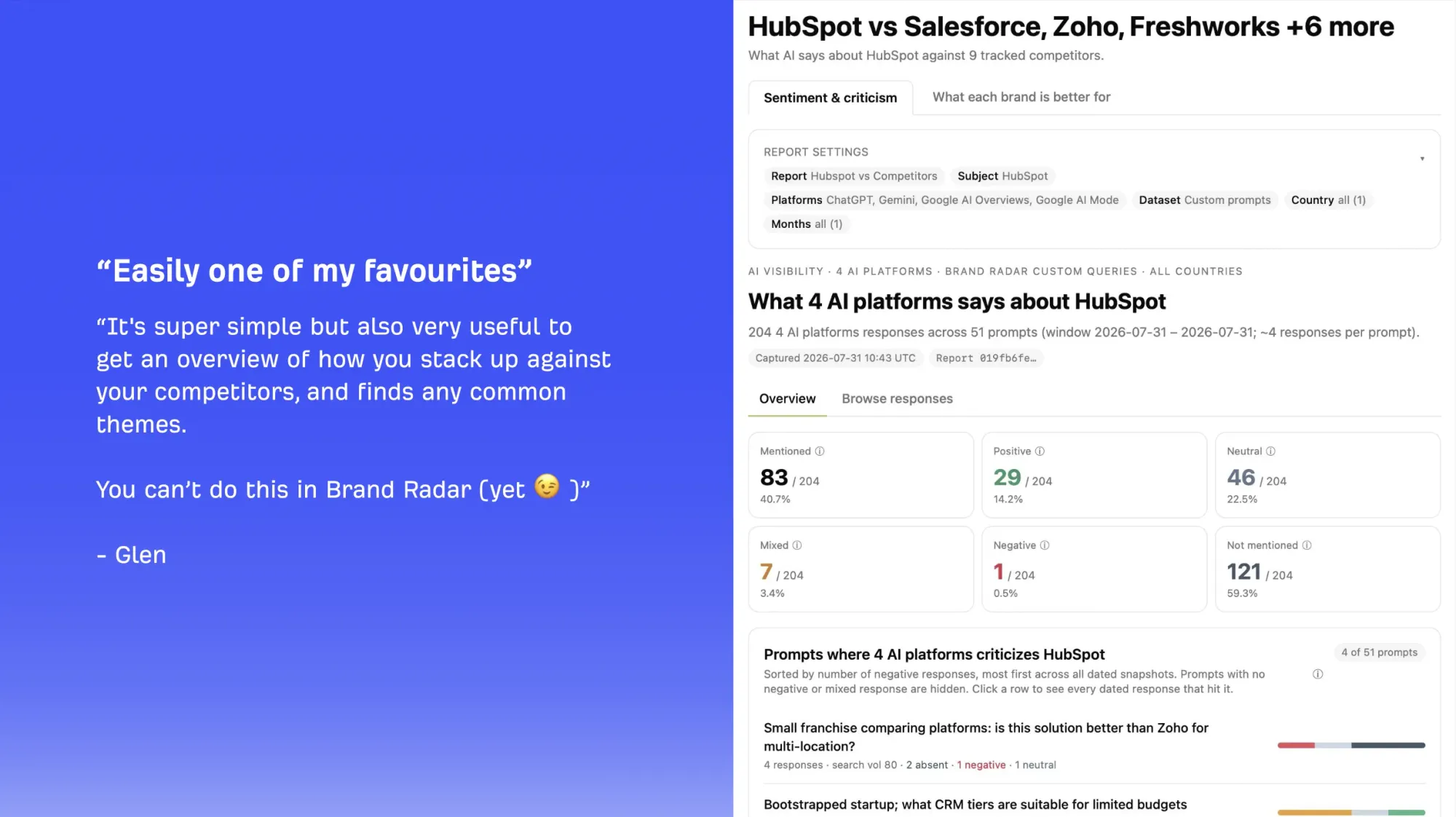
Uses AI to semantically analyze each response — classifying it as positive, negative, neutral, or mixed, and organizing the reasoning into descriptive categories.
Surfaces pros and cons — what AI says your brand is good at, what it says competitors are better at, and where those claims are coming from.
Shows the sources — including sources AI reviewed but didn't cite. Models sometimes check as many as 17 sources but only cite 4 of them, so seeing what was found but not cited matters as much as what was quoted directly.
An example brand-sentiment breakdown
Deciding what's actually worth fixing
You can't chase every negative mention AI produces, so the team uses a simple triage process:
Check the cited source first. Sometimes AI cites nothing at all; sometimes it's citing an outdated page that's simply wrong today.
If it's outdated or inaccurate information: reach out directly to the site or author and ask if they'd be willing to update it, or create new content that better addresses the misconception.
If it's a genuine gap: bring it back to the product team. Is this an area to improve? Is there a feature request buried in this feedback?
If it's simply not being discussed: sometimes the "problem" is that a real, useful feature just isn't talked about publicly yet. The fix there isn't technical — it's "good fundamental marketing," as the team put it.
What 4 AI platforms say about HubSpot
For AI to associate information with your brand, your brand or product name has to be explicitly mentioned in the content (or a well-known associated product name, the way "Yeezy" is associated with Adidas). A backlink to your site alone may help overall authority or increase the odds of being cited — but it doesn't guarantee your brand gets the credit. Mentions matter more than links here, and mentions from other relevant people/sites matter most. — Constance Tan, Product Marketing Manager at Ahrefs
What stays human
Outreach to update inaccurate third-party content, conversations with the product team about real gaps, and the ultimate prioritization of which issues are worth spending time on — all manual, by design.
Agent #3: The End-to-End Content Production Pipeline
This is the most requested use case in this entire guide and the one with the clearest guiding principle:
"The problem with using AI to write is not that you're using AI. The problem is that people are trying to write lazily with it — trying to skip the thinking instead of doing it themselves. The thinking part should never be outsourced." — Constance Tan, Product Marketing Manager at Ahrefs
How this AI agent works
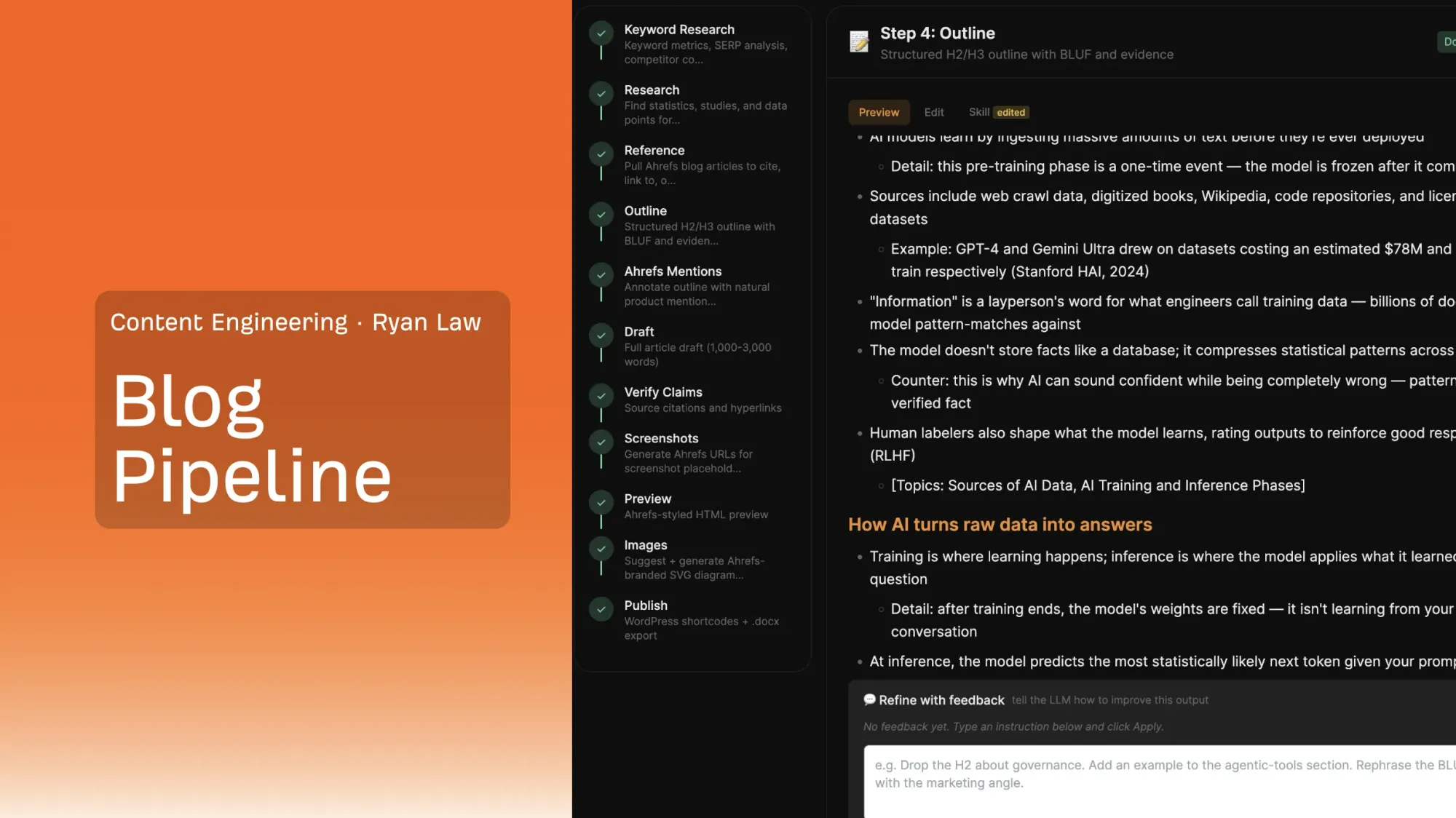
The 11-stage pipeline
Every stage below is its own discrete AI task. Just as importantly, every stage ends with a checkpoint: a human reviews the output before the pipeline moves forward.
Keyword Research — search volume, global volume, search intent (informational vs. transactional), competitive landscape, and content-gap analysis.
Research — pulls citable statistics and studies, with publisher, key finding, and a ready-to-use quote for each. A human still chooses which data points actually make the cut.
Reference — surfaces relevant internal blog posts to link to, building out internal linking automatically.
Outline — applies standard, proven content-structuring principles to lay out headers before a word of the draft is written.
Ahrefs Mentions — flags natural, non-forced places within the outline to reference the product.
Draft — generates the full article draft.
Verify Claims — checks that citations, hyperlinks, and factual claims in the draft are accurate and properly sourced.
Screenshots — has AI navigate into the product to capture relevant screenshots.
Preview — renders the draft in an Ahrefs-styled HTML preview so it can be reviewed the way it'll actually appear.
Images — suggests and generates supporting diagrams.
Publish — pushes live to WordPress, including all the custom shortcodes (notices, tables, "further reading" boxes) that are otherwise easy to get wrong by hand.
Step 4 of the pipeline
What this actually changed, in numbers
Traditional output before the pipeline: 9 articles per quarter, per writer (roughly 3 per month) — and the team doesn't always hit even that, given how much research goes into each piece.
With the pipeline, for a topic with existing information available on the web, a passable first draft can be generated in 6-12 minutes.
Team-wide, output has "at least doubled," with meaningfully more room for experimentation.
Does AI content get penalized by Google?
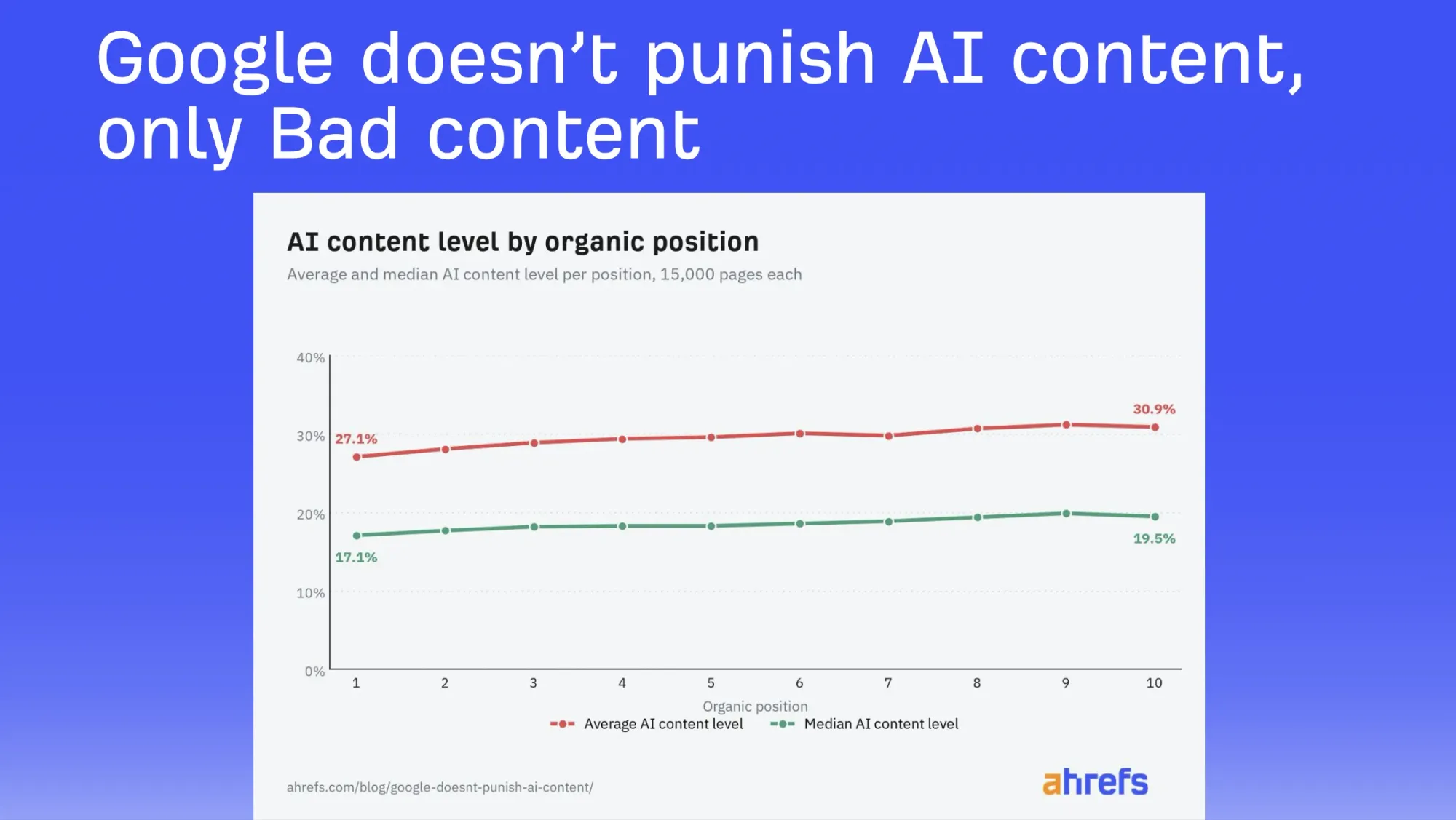
Ahrefs ran its own study on this exact question, sampling 15,000 pages at every position from 1 to 10 in Google's results and measuring AI-content share at each rank.
Average AI content level
The team's conclusion: Google doesn't punish AI content, it punishes bad content, and bad content can be human-written too. Most actively-publishing sites already use AI to some degree; the differentiator isn't whether AI touched the page, it's whether the page is actually useful.
Which AI models does the team actually use?
No single proprietary model — the pipeline was built and tested across multiple LLMs, primarily Claude, ChatGPT, and Gemini, with Kimi and other open-source models used for benchmarking comparisons.
What stays human
The topic and angle — never generated end-to-end by AI. AI-suggested titles were described as consistently vague ("your marketing gets better" — great, but how?). A good topic needs a specific, addressable problem.
Every single review checkpoint in the 11 stages above — this pipeline is designed as a series of "propose, then approve" steps, not a single unsupervised generation.
Which data points and quotes actually make the final draft — the research stage surfaces options; a human picks.
DIY: build your own version of this pipeline
Map your current manual process first. Before writing a single AI prompt, document how you currently do research, outline, and draft an article — including what a reader is supposed to take away from it.
Turn each manual stage into its own instruction. Every step above became a separate, reviewable AI task specifically because that's how a careful human writer already works — you're formalizing an existing process, not inventing a new one.
Insert a human checkpoint after every stage. Never let a pipeline run start-to-finish unsupervised — check the output, make corrections, and only then move to the next stage.
Expect months, not days. This specific pipeline took roughly a year of real iteration as the underlying models improved. Don't expect to get it right on the first attempt — and don't need to.
Agent #4: The Webinar & Event Performance Analyzer
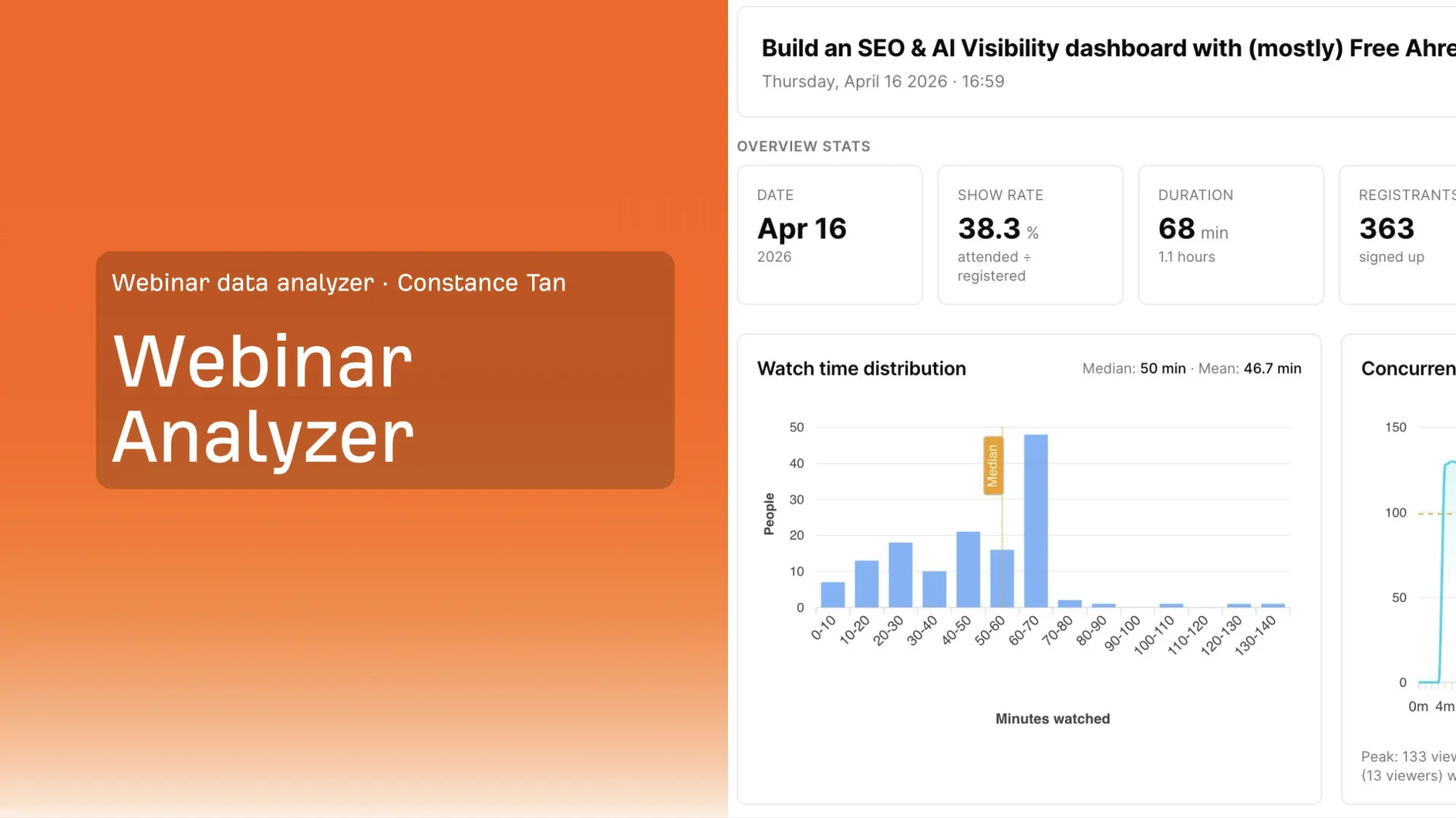
A single-webinar overview: show rate, duration, registrant count, and a full watch-time distribution
The problem it solves: most webinar and events platforms hand you a pile of exportable numbers — registrations, attendance, poll answers with no built-in way to turn that into a decision.
If you're using Contrast webinars, you're in a good position to build this yourself. — Constance Tan, Product Marketing Manager at Ahrefs
What the agent actually does
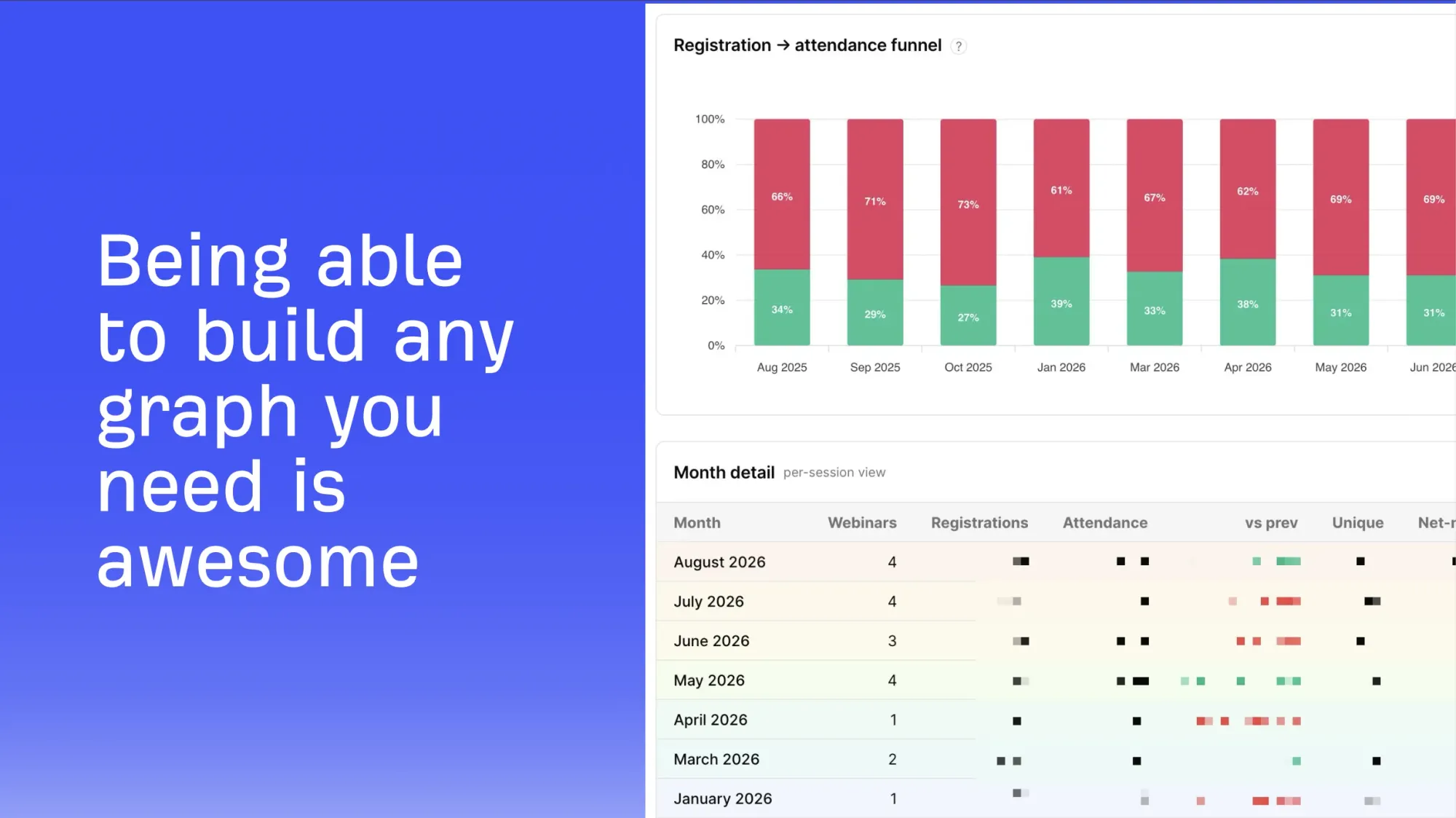
Cross-webinar trend analysis — instead of looking at one session in isolation, it compares performance across many past webinars: which times of day draw the most attendees, how registration rate compares to actual attendance by time slot, and how different regional sessions (for example, separate Asia/Europe and Americas time slots) perform differently.
Per-webinar deep dives — segmenting attendees by job seniority, and identifying exactly where in a session the concurrent viewer count dropped sharply, so the host can go back and rewatch that specific moment to diagnose what happened (ran over time? lost the room?).
Sentiment and feedback analysis — not just "did people like this webinar," but whether the same complaint theme is getting louder or quieter compared to before, so you can tell whether a fix you made actually worked.
Custom dashboards on demand — describe the chart or table you want in plain language, from a CSV export, with no scripting required. Before AI, building this kind of custom analysis meant hand-writing plotting scripts for every new question.
A cross-webinar view of the registration-to-attendance funnel over time
Finding recurring themes across many webinars
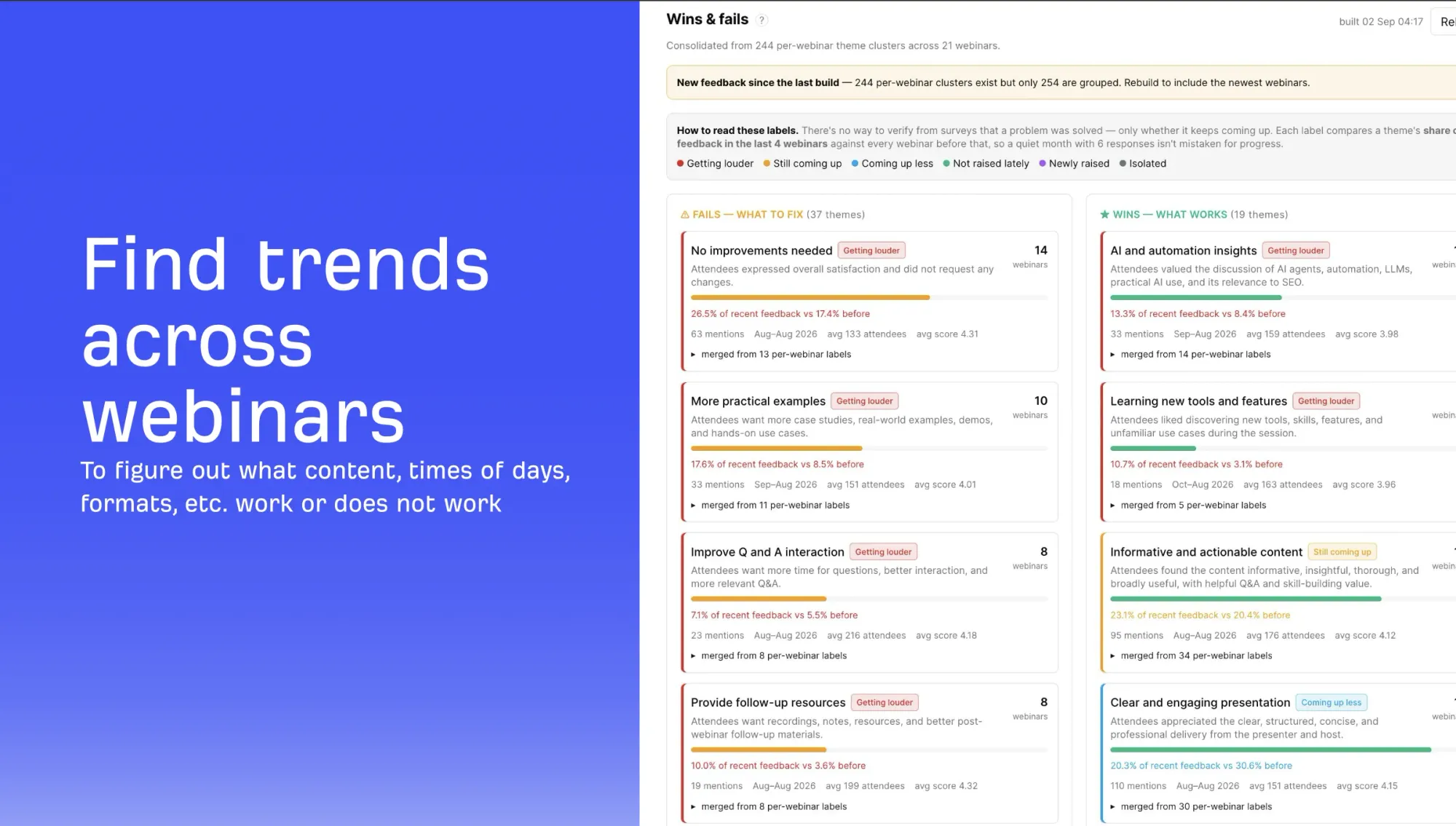
One particularly useful feature clusters open-ended feedback into recurring themes across dozens of sessions and tracks whether each theme is getting louder or quieter over time.
Feedback themes consolidated across 21 webinars and labeled by trend
In this example (consolidated from 244 per-webinar theme clusters across 21 sessions), the recurring "fails to fix" included requests for more practical examples, better Q&A interaction, and more follow-up resources while recurring "wins" included AI and automation content and clear, well-structured presentation delivery.
Data privacy checklist item: before uploading any attendee report to an AI tool, remove names and email addresses first. If that data sits inside an AI platform, it could potentially be used for training, or leaked. Do this regardless of which tool or platform you use.
💡
Benchmark against the industry, not just yourself.
Instead of only comparing a webinar against your own past sessions, compare it against industry benchmarks.
Contrast's WebinarBenchmark.com, built from Contrast's 2026 webinar stats report (over 60 stats drawn from more than 1 million registrants), is one example of this kind of comparison data covering registrations, watch time, attendance, poll engagement, and more.
What stays human
Topic selection for webinars is not automated. Ahrefs monitors community sources directly (Reddit, social conversations, customer success calls) and relies on noticing when the same question comes up repeatedly treating that as a depth signal rather than chasing search-volume breadth. AI-generated webinar title suggestions were consistently rejected as too vague; a good title has to name a specific problem, not just gesture at improvement.
The problem it solves:Reddit is one of the most trusted sources of real, unfiltered opinion online for humans researching a purchase and increasingly for AI answer engines too. If your brand isn't showing up in those conversations, your competitors probably are.
Why this is harder than it sounds
Reddit doesn't make this easy for anyone without a major platform's negotiating power:
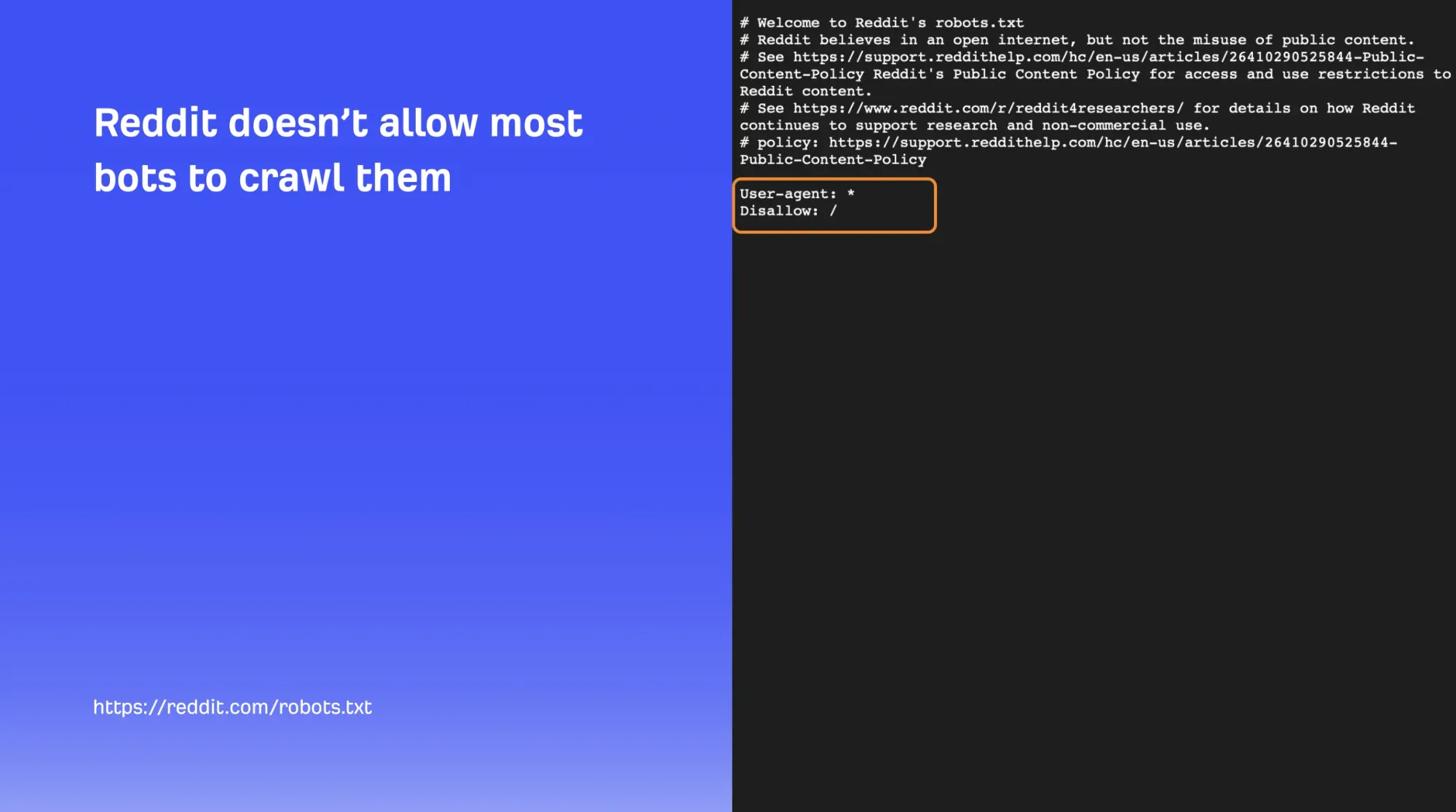
Reddit's robots.txt disallows nearly all bot crawling.
Reddit is in the process of fully deprecating its RSS feeds, which is how many smaller tools previously accessed this data (already rate-limited even before the deprecation).
The reason Reddit content shows up in Google search results or AI answer engines at all is that large platforms — Google and the major AI labs — have their own data-licensing agreements with Reddit. Individual marketers and smaller companies don't have that leverage.
Reddit's robots.txt disallows crawling for essentially all bots
The workaround
Since Reddit already permits its threads to appear in Google search results, the tool takes advantage of that existing visibility rather than trying to scrape Reddit directly:
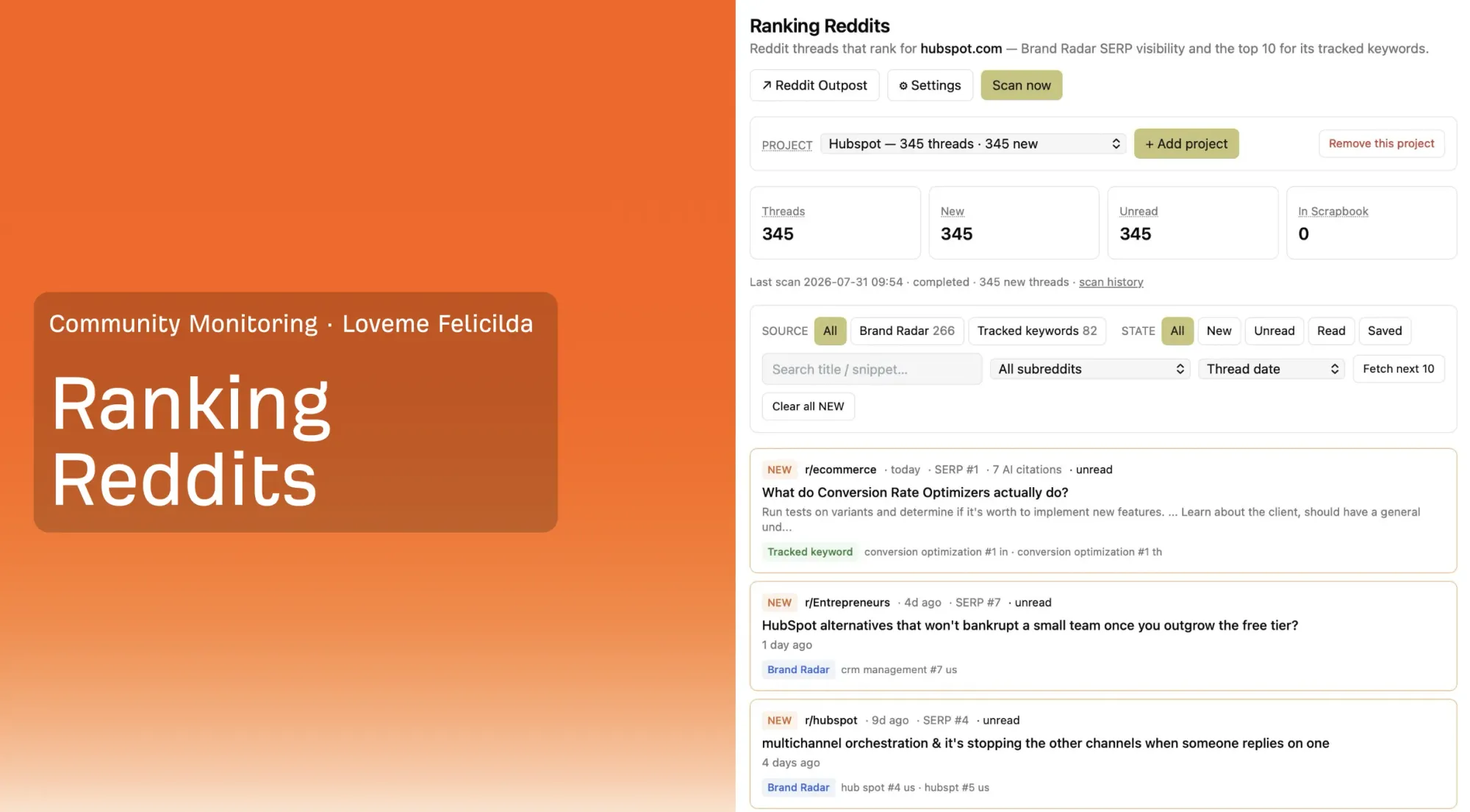
Pull the Reddit links that are already appearing in search results (via a brand-tracking tool's SERP visibility feature).
Check each thread's title and preview snippet for brand mentions — yours or a competitor's.
Surface the newest relevant conversations, sorted by recency (a few hours old, a few days old), tagged by category (a specific brand, a competitor, or a topic like SEO tool recommendations).
The Ranking Reddits dashboard
The one rule that never gets automated
"The part after that is that we manually go into these conversations to see if it's something we can help add to and not be cringy about it. This part you don't automate. Please don't." — Constance Tan, Product Marketing Manager at Ahrefs
The entire reason a platform like Reddit is trusted is that real people are talking there, not bots. Many companies have already tried automating replies and damaged their own credibility doing it. The tool's job stops at surfacing where the conversation is happening. A human decides whether and how to join it, and only when there's something genuinely helpful to add (correcting outdated information, answering an unanswered question) rather than self-promotion.
This same approach applies beyond Reddit the same logic works for any trusted, moderated community within your specific industry or niche.
Your Implementation Plan for Automating Your First Marketing Workflow
You don't need to build all five agents at once. Here's a simple, phased way to start.
Step 1: Audit your repetitive work
List every marketing task your team does on a recurring basis — weekly reporting, keyword lists, competitor checks, content briefs, event follow-ups.
Run each one through the Automation Test from this article: is it repetitive and well-documented, or does it require original judgment?
Flag anything involving customer, attendee, or user data for a privacy pass before it goes anywhere near an AI tool.
Step 2: Pick one pilot workflow
Start with the lowest-complexity win — keyword research or brand monitoring are the most self-contained, since they run against existing, well-defined data endpoints.
Save the content pipeline for later — it's the highest-value agent in this guide, but also the one that took the longest to mature.
Step 3: Build it stage by stage, with a human checkpoint at every step
Document your current manual process for that one workflow before writing a single AI prompt.
Convert each manual step into its own discrete, reviewable AI task, don't try to collapse the whole process into one giant prompt.
Insert a "review and approve" checkpoint after every stage. Never let it run end-to-end unsupervised, especially early on.
Step 4: Test, measure, and refine
Track actual time saved on the manual work.
Explicitly decide, and write down, which final decision in this workflow always stays human.
Document what you built and share it with teammates — several of the agents in this guide exist today because one person's build got copied and adapted by colleagues for their own use.
Ongoing checklist
Re-check any "Google will punish AI content" assumptions against actual ranking data periodically — this changes as models and detection methods evolve.
Keep scrubbing PII from any dataset before it touches an AI tool — every time, not just the first time.
Keep monitoring what AI models say about your brand — this is a moving target, not a one-time audit.
Conclusion
None of the five agents in this guide are flashy. There's no single tool here that "automates marketing." Instead, there are five specific, well-documented, repetitive processes — keyword filtering, brand-sentiment tracking, content production steps, webinar data analysis, and community-conversation surfacing, each handed to AI with a human checkpoint built into every single one.
That's the actual difference between the workflow in this guide and the LinkedIn hype it opened with. Nobody here claims AI replaced their judgment. It replaced the boring parts around their judgment, which is exactly the swap worth making:
"Switch from 'how can we get AI to do marketing' to 'how can we stop humans from spending their time doing the boring parts of marketing.'" — Constance Tan, Product Marketing Manager at Ahrefs
FAQ
What is an "AI agent" in marketing, and how is it different from just using ChatGPT?
An AI agent, in the sense used throughout this guide, is a multi-step, repeatable workflow — pulling data from a specific source, applying a defined set of rules or a scoring rubric, and producing a structured output — rather than a single one-off prompt. Every example in this guide (keyword scoring, brand-sentiment analysis, an 11-stage content pipeline, webinar analytics, Reddit monitoring) is a defined sequence of steps, not a single chat message.
Will using AI to write content get my site penalized by Google?
Based on Ahrefs' own analysis of 15,000 pages per ranking position, AI content share doesn't drop off as you move down the search results — in Ahrefs' analysis, it was actually slightly higher, on average, for pages ranking in position 10 than position 1. The team's conclusion: Google doesn't punish AI content specifically, it punishes low-quality content, and low-quality content can be written by humans too.
Which parts of marketing should never be fully automated with AI?
Based on the workflows in this guide: the final decision on which topics or keywords to prioritize, the original angle or idea behind a piece of content, and any direct reply to a real person in an online community. AI can prepare the options; a human should make the call.
Does linking to my website help AI mention my brand?
Not directly. For an AI system to associate information with your brand, your brand or product name generally needs to be explicitly mentioned in the source content. A backlink to your site may help your overall authority or increase the odds that a page gets cited, but it doesn't guarantee your brand gets credited by name.
How do you decide which keywords or topics are worth prioritizing?
Ahrefs uses a 0-3 "Business Potential" rubric: a 3 means your product is the only real solution to what the searcher wants; a 2 means it helps significantly but isn't the whole answer; a 1 means it's related but solvable many other ways; a 0 means it doesn't apply at all. Feeding AI an explicit, detailed description of what your product does is what makes this scoring reliable.
Is it safe to feed webinar or customer data into AI tools?
Only after you've removed personally identifiable information — names and email addresses at minimum. Data uploaded to a third-party AI platform can potentially be used for training or could leak, so this scrubbing step should happen every time, regardless of which specific AI tool or platform you're using.
Which AI models does a team like this actually use day to day?
No single model is treated as mandatory. The mix described includes Claude, ChatGPT, and Gemini for production work, with additional models like Kimi and various open-source options used specifically for benchmarking comparisons.